


StudyNexa NEET Mentor AI Planner – Complete NEET Study Planner Software


- Rs. 199
Rs. 1,999- Rs. 199
- Unit price
- per
🎓 Subscribe for Free Classes & Book Reviews
Subscribe on YouTubeProduct Information
xPackage Details |
Software Access Link |
Sold & Dispatched By |
StudyNexa |
Exams |
NEET |
Validity |
Lifetime Access |
No. Of Views |
Unlimited |
System Requirements |
Windows,IOS & Andriod Any Device (No Internet Required) |
Delivery |
Within 48 Hours |
Brand |
StudyNexa |
Description
xINTRODUCING STUDYNEXA
NEET MENTOR AI PLANNER
Your Personal NEET Study Planning & Progress Tracking System
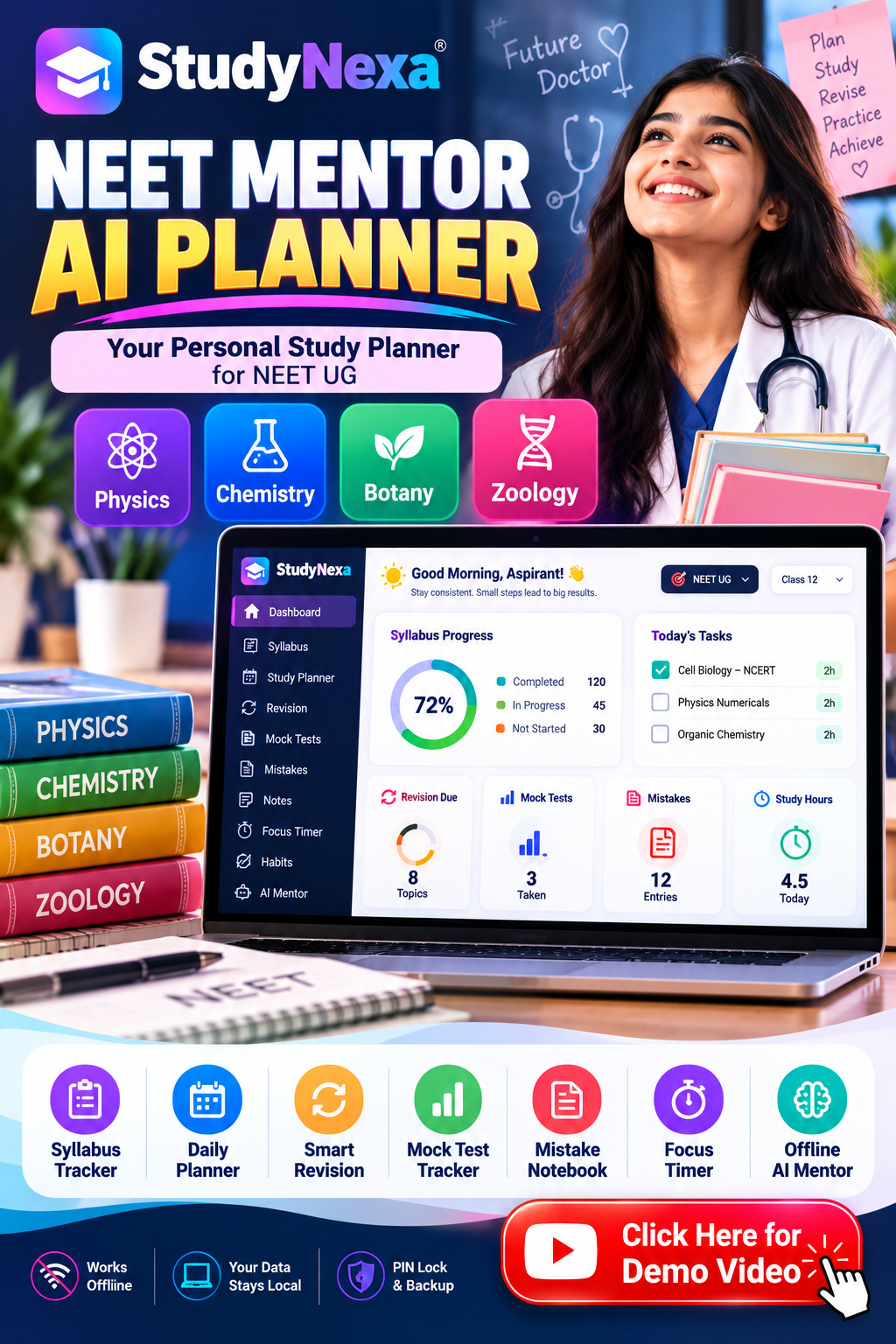
Organise your syllabus, plan daily study sessions, manage backlogs, revise completed chapters, record mock-test scores and track mistakes—all in one convenient study workspace.
📚 Syllabus Management
📅 Daily Study Planner
🔁 Revision Scheduler
📊 Mock-Test Tracker
✨ Offline Study Mentor
Stop Managing Your Preparation in Scattered Places
NEET preparation involves more than reading chapters. You also need to keep track of unfinished topics, schedule revision, practise questions, analyse mock tests, remember recurring mistakes and maintain a consistent study routine.
When your progress is spread across notebooks, loose sheets, separate timers and different apps, it can become difficult to see what needs attention next.
StudyNexa NEET Mentor AI Planner brings these study-management activities together in one organised digital workspace. It helps you turn preparation goals into trackable tasks, maintain a record of your progress and make more informed decisions about what to study and revise next.
What Does the NEET Mentor AI Planner Contain?
A collection of connected tools designed to help you organise your study routine and monitor your preparation.
📊
1. Progress Dashboard
View syllabus progress, subject completion, study hours, study streaks and an exam countdown when you set your exam date.
📚
2. Syllabus Tracker
Organise Physics, Chemistry, Botany and Zoology chapters and mark individual topics as Not Started, In Progress or Done.
🗓️
3. Daily Study Planner
Create dated tasks, organise priorities, manage backlogs, set milestones and use Auto-plan to create dated study tasks.
🔄
4. Revision Scheduler
Bring completed topics back for revision using configurable intervals, with 1, 3, 7, 15 and 30 days as the defaults.
📈
5. Mock-Test Tracker
Record your mock-test attempts and scores so you can review your results over time.
🎯
6. Mistake Notebook
Record mistakes, categorise the reasons behind them and mark entries resolved when you have addressed them.
⏱️
7. Focus Timer
Use a configurable Pomodoro-style focus and break timer that logs your study sessions.
📝
8. Study Notes
Keep formula sheets, short notes and study references organised inside your planner.
🌱
9. Habit Tracker
Log habits such as sleep, exercise, water intake and screen time. Enable or disable this module as needed.
🤖
10. Offline AI Mentor
Explore built-in study guidance on planning, revision, backlogs, subject strategies, focus, motivation and exam preparation in English or Hinglish.
🔐
11. Settings & Personalisation
Customise appearance, daily study goals, focus duration, break duration, revision intervals and optional PIN lock.
💾
12. Backup & Restore
Export your planner data as a JSON backup and import it later to restore your records or move them to another device.
How Is It Useful for Your NEET Preparation?
The value is not just in having more features. It is in using your study records to make everyday preparation easier to organise.
✓ Understand What Is Left
Topic-level progress helps you identify unfinished portions of the syllabus instead of relying on memory or repeatedly checking separate lists.
✓ Give Each Day a Clear Direction
Turn preparation goals into individual tasks with dates and priorities. Use your planner to decide which work deserves attention first.
✓ Keep Older Topics in Rotation
A revision queue makes previously completed topics visible again, helping you build regular revision into your study routine.
✓ Learn From Test Records
Record mock scores and mistakes in dedicated sections. Review the records to help choose what to practise next.
✓ Make Study Time More Visible
Use the focus timer and study-session log to monitor recorded study time and reflect on your routine.
✓ Keep Your Workflow Together
Access planning, revision, notes, habits, test records and offline guidance within one application instead of managing each activity in a separate tool.
Explore Every Major Feature
Here is how the individual modules fit into your preparation workflow.
Your Planner. Your Settings. Your Study Records.
Customise the experience and keep control of your locally stored preparation data.
🎨 Personalised Appearance
Choose dark or light mode and available accent colours.
🎯 Custom Study Targets
Configure your daily study-hour goal, focus duration and break duration.
🔐 Optional PIN Lock
Set an app PIN to add a layer of access control to the planner.
💾 Data Backup
Export and import planner data using a JSON backup file.
Designed for Offline Use
StudyNexa NEET Mentor AI Planner is an HTML-based application designed to run locally in a modern browser. Normal planner use does not require an online account or an internet connection.
- No online account is required.
- No cloud-based mentor service is required for its built-in guidance.
- Planner records are saved locally in the browser.
- Backup and restore tools help you move your data when needed.
Data storage notice: Your records are stored on the device/browser you use. They do not automatically sync to another device. Clearing browser data, using private browsing or moving/renaming the HTML file can make saved information inaccessible. Keep the file in a fixed location and export backups regularly. Importing a backup replaces the current planner data on that device. The optional PIN is an access-control feature, not a substitute for device security or encrypted cloud storage.
StudyNexa vs. a Basic Study Notebook
See the practical difference between keeping separate manual lists and using a dedicated digital planning workspace.
| What You Need | Basic Notebook Workflow | StudyNexa NEET Planner |
|---|---|---|
| Syllabus tracking | Update progress manually | Track topics and view progress |
| Daily tasks | Maintain separate lists | Organise dated tasks, priorities and backlogs |
| Revision schedule | Remember or write reminder dates | Use configurable revision intervals |
| Mock-test records | Record results in separate pages | Use a dedicated score-tracking module |
| Mistake analysis | Write errors wherever convenient | Categorise mistakes and mark them resolved |
| Study-time tracking | Calculate or log manually | Built-in focus timer and session log |
| Study guidance | Use separate resources | Built-in offline guidance library |
| Backup | Photocopy or copy notes manually | Export and import JSON data |
This is an illustrative comparison with a basic notebook workflow, not a claim that every other planner lacks these features. A notebook remains useful for handwritten working, diagrams and detailed problem-solving.
Who Should Use This Planner?
Class 11 Students
Build a study-planning routine early and track topics as you work through the syllabus.
Class 12 Students
Organise current studies alongside revision of previously completed chapters.
NEET Droppers
Maintain a record of backlogs, mock scores, revision tasks and mistakes throughout your preparation.
Self-Study Students
Keep planning and progress records organised even when following a self-managed study routine.
Students Who Like Structure
Use checklists, dated tasks, progress records and revision queues to create a more systematic workflow.
Offline-First Users
Use a browser-based planner without relying on a cloud account for normal operation.
How to Get Started
1
Set Up Your Profile
Enter your name, Class 11/Class 12/dropper track and exam date if known.
2
Review Your Syllabus
Check the supplied chapters and customise them to match your preparation needs.
3
Create Your Tasks
Add study activities, due dates and priorities, including unfinished work.
4
Study, Revise & Test
Use the focus timer, revision queue, mock-test tracker and mistake notebook.
5
Review & Adjust
Review your records, adjust upcoming tasks and export backups regularly.
What Is Included?
- StudyNexa NEET Mentor AI Planner: the HTML-based digital planner application.
- Preloaded syllabus template: editable subject, chapter and topic structure for Physics, Chemistry, Botany and Zoology.
- Integrated planning tools: dashboard, daily planner, revision scheduler, mock-test tracker, mistake notebook, notes, focus timer and optional habit tracker.
- Built-in offline mentor: predefined study-planning and NEET preparation guidance in English or Hinglish.
- Personalisation options: themes, accent colours, study goals, timer settings, revision intervals and optional PIN lock.
- Backup and restore functionality: export and import your planner data in JSON format.
This is a digital software product, not a printed book, a live tutoring service or a subscription to a cloud-based AI platform. Do not imply that video lessons, question banks, official mock papers or live teacher support are included unless you provide them separately.
Compatibility & Important Information
- Designed to run in a modern web browser that supports HTML, CSS and JavaScript.
- Normal planner features are designed for offline use after you have the HTML file available locally.
- Planner data is saved locally in the browser and does not automatically synchronise across devices.
- Keep the HTML file in a fixed location and export backups regularly.
- The optional PIN lock does not replace device-level security.
- The default syllabus is a starting template, not a guarantee of complete alignment with the current NEET syllabus.
Frequently Asked Questions
1. What exactly is StudyNexa NEET Mentor AI Planner?
It is an HTML-based digital study planner that combines syllabus progress tracking, daily tasks, revision scheduling, mock-test records, mistake tracking, notes, focus timing, habits and a built-in offline guidance mentor.
2. Is it suitable for Class 11, Class 12 and dropper students?
Yes. You can choose your preparation track and customise the chapters, topics and tasks. Students should check the included syllabus against the official NTA syllabus for their examination year.
3. Does it work without internet?
The application is designed for offline use in a modern browser once the HTML file is available on your device. Its built-in mentor uses a predefined guidance library rather than a live online AI service.
4. Is the AI Mentor a live ChatGPT-style service?
No. It is an offline mentor with a fixed guidance library that can use your planner data for supported suggestions. It does not provide unrestricted live AI conversation or solve arbitrary numerical questions.
5. Can I modify the syllabus and chapters?
Yes. Subjects, chapters and topics can be added, edited, deleted and reordered. The default template should be checked against the official syllabus and customised where needed.
6. How does the revision scheduler work?
Completed topics are brought back into the revision queue at default intervals of 1, 3, 7, 15 and 30 days. You can customise the intervals in Settings.
7. Can I record my mock-test marks?
Yes. Use the mock-test module to record your attempts and scores. You can refer to your recorded results when reviewing your preparation.
8. Will my data automatically transfer to another laptop or phone?
No. Your records are stored locally. Export a JSON backup on the original device and import it on the new device. Importing a backup replaces the current planner data on the destination device.
9. What happens if I clear my browser data?
Clearing browser data may remove access to locally saved planner information. Keep your HTML file in a fixed location and export backups regularly.
10. Does the planner guarantee a NEET score, rank or selection?
No. It is a planning and tracking tool, not a result guarantee. Your performance depends on learning, practice, revision, test performance and other individual factors.
11. Does it include live classes or a question bank?
The planner file includes the listed planning and tracking modules. Live classes, teacher support, video lectures and a separate question bank are not identified as included components of this software.
MAKE YOUR STUDY ROUTINE MORE ORGANISED
Plan with Purpose. Track Every Step.
Bring syllabus management, daily planning, revision, mock-test records, mistake tracking and study guidance together in one workspace built for your NEET preparation journey.
✓ Organise
✓ Track
✓ Revise
✓ Review
Educational disclaimer: StudyNexa NEET Mentor AI Planner is an independent study-planning and productivity tool. It is not affiliated with or endorsed by the National Testing Agency (NTA), NEET or any government examination authority. The included syllabus is an editable starting template, and chapter priorities are suggestions. Always verify the official syllabus, exam dates, marking scheme and examination rules through the relevant official NTA notices. The planner does not replace qualified teaching, official examination resources or individual academic judgement.


