


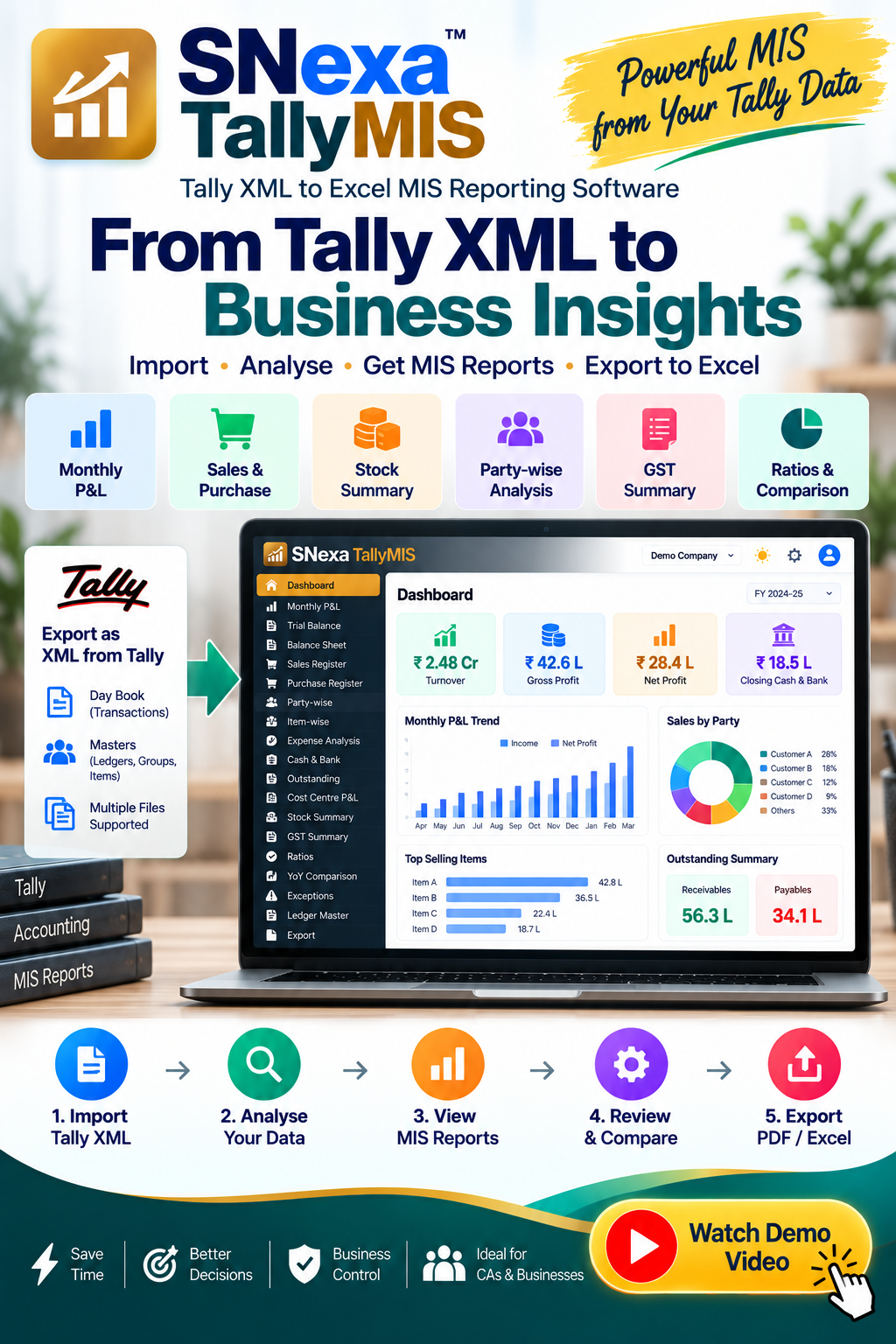
SNexa TallyMIS – Tally XML to Excel MIS Reporting Software for Business & CA


- Rs. 199
Rs. 7,999- Rs. 199
- Unit price
- per
🎓 Subscribe for Free Classes & Book Reviews
Subscribe on YouTubeProduct Information
xPackage Details |
Software Access Link |
Sold & Dispatched By |
StudyNexa |
Validity |
Lifetime Access |
No. Of Views |
Unlimited |
System Requirements |
Windows,IOS & Andriod Any Device (No Internet Required) |
Delivery |
Within 48 Hours |
Brand |
StudyNexa |
Description
xSNexa Professional Accounting Software
SNexa TallyMIS
Tally XML → Excel MIS Reporting Software
Convert your Tally XML data into structured management reports for profitability, sales, purchases, expenses, stock, outstanding, GST review, ratios and business performance analysis.
Monthly P&L Sales & Purchase Stock Outstanding GST Summary Excel MIS
From Tally Data to Management Information
SNexa TallyMIS helps convert your Tally XML export into a structured MIS reporting workflow. Import your Tally transactions and Masters, review your accounting data and generate multiple business analysis reports in one place.
Tally XML
→
Import & Analyse
→
MIS Reports
→
Excel Export
Key Benefits of SNexa TallyMIS
Turn accounting data into practical management information without manually building every MIS report.
📊
Faster MIS Preparation
Import Tally XML and generate multiple management reports from the same dataset.
📈
Track Profitability
Review monthly sales, direct costs, expenses, gross profit and net profit.
👥
Analyse Parties
Identify customer and supplier business volumes using party-wise reporting.
📦
Understand Stock
Review item-wise purchases, sales, quantities and closing stock information.
💰
Monitor Cash & Bank
Analyse receipts, payments, monthly movement and closing balances.
🔍
Spot Exceptions
Review unbalanced vouchers, missing narration, round figures and dormant-ledger flags.
📅
Compare Periods
Load a prior period to compare turnover, gross profit, expenses and net profit.
📗
Excel MIS Export
Export selected reports as an organized Excel MIS workbook.
How SNexa TallyMIS Works
1️⃣
Export
Export Day Book and Masters from Tally as XML.
2️⃣
Import
Load your Tally XML files into SNexa TallyMIS.
3️⃣
Analyse
Review accounting information through multiple MIS reports.
4️⃣
Review
Check profitability, parties, expenses, stock and exceptions.
5️⃣
Export
Export the selected MIS sheets to Excel.
Complete MIS Reports Included
📊 Dashboard
Turnover, direct costs, gross profit, expenses, net profit, cash & bank, stock, debtors, creditors and working capital.
📈 Monthly P&L
Month-wise income, direct cost, expenses, gross profit and net profit.
📋 Trial Balance
Opening, debit, credit and closing balances with primary-group classification.
⚖️ Balance Sheet
Group-level assets, liabilities and equity summary with difference check.
↗️ Sales Register
Party, GSTIN, state, item, quantity, rate, value, tax and total.
↘️ Purchase Register
Supplier, GSTIN, item, quantity, rate, purchase value, tax and total.
👥 Party-wise Analysis
Sales, purchases, voucher count and percentage contribution.
◈ Item-wise Analysis
Quantity sold, sales value, average selling rate, purchases, average cost and indicative margin.
💸 Expense Analysis
Group-wise and ledger-wise expenses, monthly trend, percentage of turnover and average.
🏦 Cash & Bank
Opening, receipts, payments, monthly movement and closing balance.
◔ Outstanding
Party-wise receivable/payable snapshot with credit period.
◇ Cost Centre P&L
Income, direct cost, gross profit, expenses and net profit by cost centre.
📦 Stock Summary
Opening, inward, outward and closing quantity/value with godown net quantity.
% GST Summary
Monthly book-side taxable sales, output tax, taxable purchases and input tax.
◎ Ratio Analysis
Standard ratio analysis with common benchmark references.
⇄ YoY Comparison
Compare current and prior-period turnover, costs, gross profit, expenses and net profit.
⚠ Exceptions
Unbalanced vouchers, missing narration, round figures and dormant ledgers.
⌸ Ledger Master
Ledger, group, MIS head, GSTIN, opening, movement and closing information.
Import Your Tally Data
SNexa TallyMIS is designed around Tally XML exports. Load your transaction data along with Masters information for better ledger and group classification.
📄 Tally Transactions
Export Day Book/vouchers from Tally as XML and load them into the software.
📚 Tally Masters
Load ledger, group and item Masters to improve classification and reporting.
🔄 Multiple Files
Multiple XML files can be loaded and merged into the reporting dataset.
📅 Prior Period
Load a prior-period XML separately for YoY comparison.
Important: Export the required data from Tally as XML. Excel, PDF or ASCII exports are not the input format for this application.
Export Your MIS to Excel
Select the report sheets you need and export them together as an Excel MIS workbook. Individual report sheets can also be exported separately.
📗 Multi-Sheet Excel
Build an Excel workbook containing the selected MIS reports.
📊 Select Reports
Keep only the sheets required for your review or management reporting.
📋 Working Papers
Use detailed registers, ledgers and analysis sheets for review.
SNexa TallyMIS vs Manual Excel MIS Preparation
| Area | Manual Excel MIS | SNexa TallyMIS |
|---|---|---|
| Data Source | Manual extraction and preparation | Import Tally XML |
| Monthly P&L | Build formulas and monthly columns manually | Built-in Monthly P&L report |
| Sales Register | Prepare/filter separately | Built-in Sales Register |
| Purchase Register | Prepare/filter separately | Built-in Purchase Register |
| Party Analysis | Manual pivot/report creation | Party-wise Sales & Purchase report |
| Item Analysis | Manual calculations | Item-wise sales, purchases and indicative margin |
| Expense Analysis | Separate formulas/pivots | Built-in Expense Analysis |
| Stock Analysis | Separate stock analysis | Built-in Stock Summary |
| Cash & Bank | Manual monthly calculations | Built-in Cash & Bank Movement report |
| Outstanding | Manual filtering and reporting | Outstanding Snapshot |
| GST Review | Manual summary | Monthly book-side GST Summary |
| Ratios | Manual formulas | Built-in Ratio Analysis |
| YoY Analysis | Manual comparison | Built-in current vs prior comparison |
| Excel Output | Maintain multiple workbooks/sheets | Generate selected MIS reports into Excel |
Complete Feature Comparison
| Feature | Included | Details |
|---|---|---|
| Tally XML Import | ✓ | Import Tally transaction XML |
| Masters Import | ✓ | Ledgers, groups and item Masters |
| Multiple XML Files | ✓ | Merge multiple imported files |
| Prior Period XML | ✓ | Used for YoY comparison |
| Dashboard | ✓ | Business health and headline financial metrics |
| Monthly P&L | ✓ | Month-wise income, costs, expenses and profit |
| Trial Balance | ✓ | Opening, debit, credit and closing |
| Balance Sheet | ✓ | Group-level summary and difference check |
| Sales Register | ✓ | Party, GSTIN, item, quantity, rate, tax and value |
| Purchase Register | ✓ | Supplier, GSTIN, item, quantity, rate, tax and value |
| Party-wise Report | ✓ | Sales, purchases and contribution |
| Item-wise Report | ✓ | Sales, purchases, quantities and indicative margin |
| Expense Analysis | ✓ | Group, ledger, monthly and turnover analysis |
| Cash & Bank | ✓ | Receipts, payments and monthly movement |
| Outstanding | ✓ | Receivable/payable snapshot |
| Cost Centre P&L | ✓ | Cost-centre profitability |
| Stock Summary | ✓ | Opening, inward, outward and closing |
| GST Summary | ✓ | Monthly book-side output/input tax review |
| Ratio Analysis | ✓ | Standard financial ratios |
| YoY Comparison | ✓ | Current vs prior period |
| Exceptions | ✓ | Review potential data issues |
| Ledger Master | ✓ | Ledger classification and MIS mapping |
| Excel Export | ✓ | Multi-sheet MIS workbook |
| Offline Operation | ✓ | Single-file offline-first application |
Who Should Use SNexa TallyMIS?
👨💼 Chartered Accountants
Analyse client accounting data and prepare recurring MIS reports.
🏢 Business Owners
Understand sales, expenses, profitability, stock and working capital.
📊 Finance Teams
Create recurring management reports from Tally accounting data.
📋 Accounting Firms
Review multiple accounting dimensions through structured reports.
Offline-First Workflow
SNexa TallyMIS is built as a single-file offline-first application. The application code specifies that there are no network calls.
✓ Tally XML Import ✓ Local Data Processing ✓ Excel Export ✓ No Network Calls
Important Information
- This product works with Tally XML exports; it does not directly connect to your Tally company.
- The GST Summary is a book-side review report, not a GST return filing report.
- Item-wise gross margin is indicative and based on average selling/purchase rates; it is not a full inventory costing run.
- The Balance Sheet report is a group-level summary. It is not the same as a Schedule III financial-statement preparation system.
- Review the MIS mapping and accounting figures before using reports for business, audit or statutory purposes.
Frequently Asked Questions
Turn Your Tally Data Into Actionable MIS
Import your Tally XML, analyse profitability, sales, purchases, expenses, stock, outstanding, cash, GST review and business performance, then export your selected reports to Excel.
Get SNexa TallyMIS


