


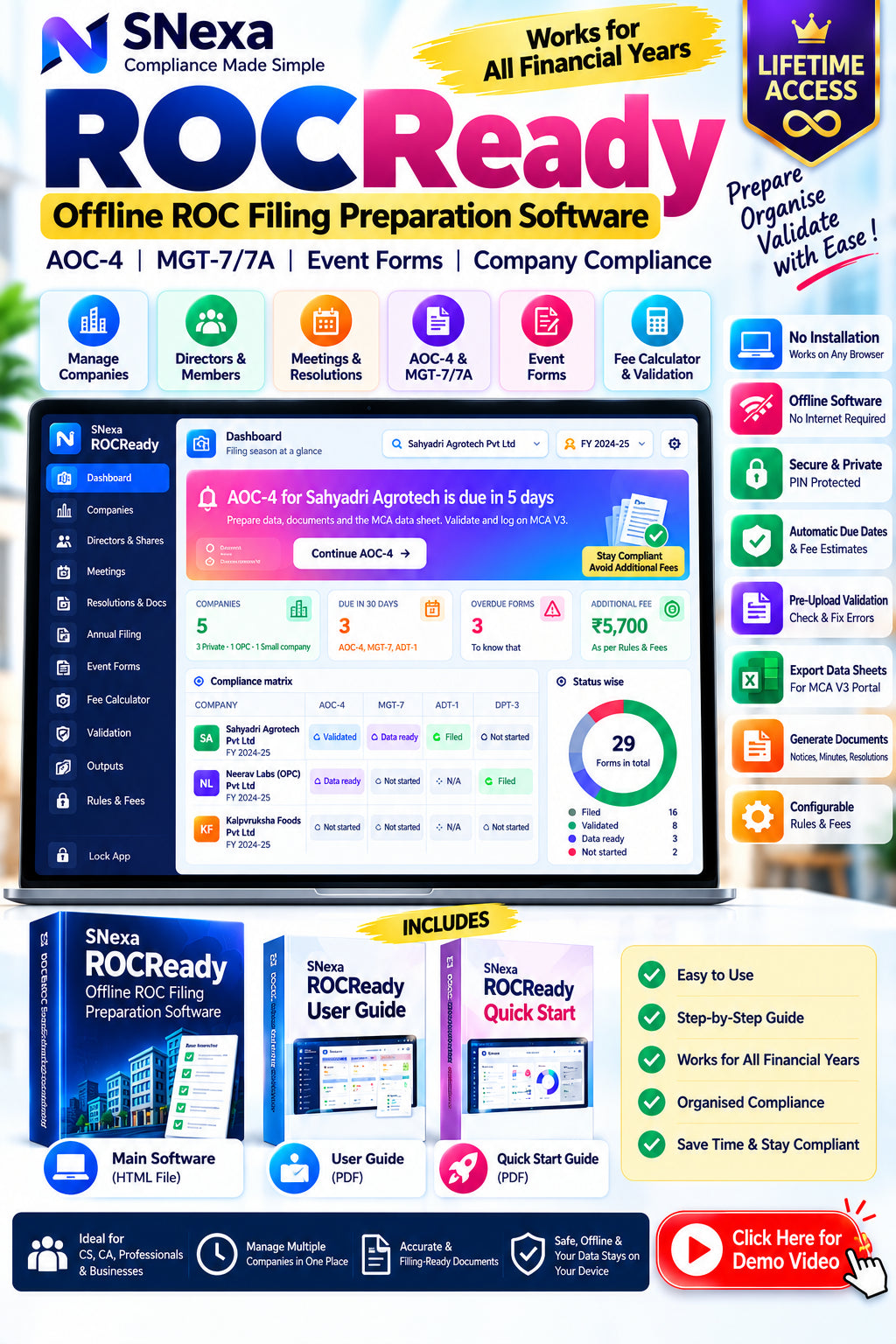
SNexa ROCReady – Offline ROC Filing Preparation Software for AOC-4, MGT-7, Event Forms & Company Compliance Management


 Self Paced Learning

- Rs. 999
Rs. 5,999- Rs. 999
- Unit price
- per
🎓 Subscribe for Free Classes & Book Reviews
Subscribe on YouTubeProduct Information
xPackage Details |
Software Access Link |
Sold & Dispatched By |
StudyNexa |
Validity |
Lifetime Access |
No. Of Views |
Unlimited |
System Requirements |
Windows,IOS & Andriod Any Device (No Internet Required) |
Delivery |
Within 48 Hours |
Brand |
StudyNexa |
Description
xSNexa ROCReady
Offline ROC Filing Preparation & Company Compliance Management Software
Organise company records, directors, members, meetings, resolutions, annual filing data, event-form worksheets, fee estimates and pre-upload checks in one practical workspace—designed for company secretaries, CA firms, corporate compliance teams and professionals managing multiple companies.
✓ Offline preparation✓ AOC-4 & MGT-7/7A✓ 8 event-form workspaces✓ Draft documents✓ PIN-protected encrypted data
14AOC-4 sections
11MGT-7 sections
8Event-form workspaces
12+Resolution templates
What is SNexa ROCReady?
SNexa ROCReady is an offline preparation tool for Registrar of Companies (ROC) compliance work. Add each company and maintain its master details, directors and KMP, members register, meetings and filing information. The app uses that stored information to help prepare data sheets, draft documents, fee estimates and a validation report before you work on the MCA V3 portal.
Important distinction: ROCReady prepares and organises information offline. It does not connect to MCA, submit forms, sign using DSC, make payments or verify information against MCA records. You complete filing on the official MCA V3 portal.
Key benefits for day-to-day compliance work
A clearer workflow for recurring company records and filing preparation.
🗂️
Keep company information organised
Maintain company masters, directors, KMP, shareholding information, meetings and filing workspaces in one browser-based app rather than scattering working details across separate files.
🧾
Prepare annual filing data in sections
Work through AOC-4 and MGT-7/7A sections, save progress and export data sheets for use while completing the relevant forms on MCA.
📑
Generate working drafts and meeting documents
Prepare notices, agendas, minutes, attendance records, resolutions and other supported document drafts. Edit previews and download supported outputs.
⏰
See deadlines and filing status together
Use the dashboard's compliance matrix, upcoming deadlines, overdue indicators and preparation progress to help plan work across companies.
🧮
Estimate filing fees and delays
Review normal-fee and additional-fee estimates using editable rules and dates. Always confirm the final amount displayed by the MCA portal.
🛡️
Run checks before portal entry
Review errors, warnings and passed checks for supported data, save a validation report and correct issues before preparing the filing on MCA.
🔐
Keep data stored locally
The guide describes PIN-based encrypted local storage and encrypted backup files. Data is stored in the browser used for the app, so use the same browser and keep regular backups.
⚙️
Adjust rules when requirements change
Due-date rules, fee settings and waiver-scheme settings are editable in the Rules & Fees area, reducing dependence on hard-coded defaults. Check current MCA notifications before use.
How the workflow works
Move from company setup to a reviewed filing worksheet with a repeatable process.
🏢1. Add company
CIN, capital, AGM, auditor
CIN, capital, AGM, auditor
→
👥2. Add people & records
Directors, KMP, members
Directors, KMP, members
→
📅3. Prepare meetings
Notices, minutes, resolutions
Notices, minutes, resolutions
→
📋4. Complete filing data
AOC-4, MGT-7/7A, events
AOC-4, MGT-7/7A, events
→
✓5. Validate & export
Review, then file on MCA
Review, then file on MCA
The official MCA portal remains the place to upload or enter form data, attach documents, sign with DSC, pay fees and submit the filing.
Features explained in simple terms
🏢 Company master
Add company name, CIN, type, ROC, AGM and other dates, capital, face value, address, email and auditor details. The app checks CIN format, duplicates and a paid-up-capital versus authorised-capital condition.
👥 Directors, KMP & members
Record director/KMP details, DIN or PAN as applicable, board category, KYC/DSC status, shareholding and cessation dates. Maintain a members register and generate a shareholder-list spreadsheet for MGT-7 support.
📆 Meetings & documents
Schedule Board meetings, AGMs, EGMs and committee meetings. Generate editable notices, agendas, minutes and attendance records, then print/save as PDF or download Word files where supported.
📝 Resolutions & document templates
Use 12 resolution templates, CTC workflows, 19 document types and custom templates with supported placeholders. Review every draft and tailor it to the actual facts and legal requirements.
📊 Annual filing workspace
AOC-4 includes 14 sections covering company details, auditor information, balance sheet, profit and loss, related-party information, CSR-related areas, declarations and attachments. MGT-7 includes 11 sections covering share capital, members, directors/KMP, meetings, remuneration and other annual-return data.
🧾 Event-form workspaces
Prepare worksheets for ADT-1, DPT-3, MSME-1, DIR-12, MGT-14, PAS-3, SH-7 and INC-20A. Fill supported fields, check attachment prompts, review due-date/fee estimates and export the data sheet.
🧮 Fee calculator & editable rules
Estimate normal and additional fees based on the form, dates and configured rule. Update fee slabs, late-fee methods, due-date settings and waiver options in Rules & Fees when appropriate.
🛡️ Validation report
Review supported checks including CIN/DIN formats, capital, minimum directors, KYC/DSC, member totals, AGM date, meeting records and filing-section completion. Use Fix where available and save a report for your working file.
📤 Export, backup & restore
Generate company master and filing data sheets in Excel-compatible format, validation reports, fee estimates and saved documents. Create an encrypted .rocr backup and restore it with the PIN used when that backup was made.
Supported forms and outputs
| Area | What you can prepare | Output / purpose |
|---|---|---|
| AOC-4 | 14 filing sections including balance sheet and profit & loss information | Excel-compatible data sheet for use while completing MCA form |
| MGT-7 / MGT-7A | 11 annual-return sections; MGT-7A workspace for OPC and small companies | Annual-return data and shareholder-list support |
| Event forms | ADT-1, DPT-3, MSME-1, DIR-12, MGT-14, PAS-3, SH-7, INC-20A | Form-specific data sheets, due-date and fee estimates |
| Meeting documents | Notices, agendas, minutes and attendance | Editable preview, PDF print/save and Word download where supported |
| Resolutions & other documents | 12 resolution templates, CTC workflow, 19 document types and custom templates | Draft documents to review and adapt before use |
| Validation & fee reports | Supported pre-upload checks and fee calculations | Saved validation report and fee estimate |
| Backup | Full local data backup and restore | Encrypted .rocr file; restore requires the original backup PIN |
Comparison: manual scattered workflow vs. ROCReady
A workflow comparison—not a claim that the software replaces professional judgement or the MCA portal.
| Typical work requirement | Separate manual files | With SNexa ROCReady |
|---|---|---|
| Company and director records | May be maintained across different spreadsheets and folders | ✓ Company, director/KMP and members modules in one app |
| Meeting drafts | Documents may need to be prepared separately each time | ✓ Supported editable notice, agenda, minutes and attendance drafts |
| Annual filing preparation | Progress tracking may be manual | ✓ Section-based AOC-4 and MGT-7/7A workspaces |
| Event-form preparation | Data may need separate preparation for each form | ✓ Eight supported event-form workspaces |
| Fee and due-date review | May require separate notes or spreadsheets | ✓ Dashboard, editable rules and fee estimates |
| Pre-upload checking | Checks may be tracked manually | ✓ Built-in supported checks and validation report |
| Data portability | Files and versions may be spread across folders | ✓ Exported working files and encrypted full backup |
Who can use SNexa ROCReady?
👨💼
Company Secretaries & CS firms
Organise annual returns, meeting records, resolutions and event-form preparation for client companies.
📚
CA firms & compliance professionals
Maintain company masters, monitor filing preparation and create working data sheets and reports.
🏢
In-house corporate teams
Keep records and draft documents organised before completing official filings on MCA.
Getting started
⬇️1. Open the HTML file
Use current Chrome, Edge or Firefox
Use current Chrome, Edge or Firefox
→
🔐2. Activate if prompted
Create and remember your PIN
Create and remember your PIN
→
🏢3. Add a company
Or explore fictional demo data
Or explore fictional demo data
→
📋4. Prepare & review
Export, validate and back up
Export, validate and back up
Use the included Quick Start guide for the first workflow and the full User Guide for module-by-module instructions. Keep the app in a fixed folder and use the same browser: the app's data is stored locally in that browser. Back up regularly, especially before clearing browser data or moving to another computer.
Frequently asked questions
Does ROCReady file forms directly on the MCA portal?
No. It prepares data sheets and draft documents offline. You must log in to MCA V3, enter or upload the data, attach documents, sign with DSC, pay the fee and submit the form yourself.
Does ROCReady connect to or verify data with MCA?
No. It does not connect to MCA. Its CIN, DIN and other supported format checks are performed offline and do not confirm the details against official MCA records.
Does it work without internet?
The app is designed to run locally in a supported browser without an internet connection after the HTML file is available on your device.
Will it work for future financial years?
The user guide says financial years are added automatically each April. Due-date and fee rules should still be checked and updated against current MCA notifications.
Where is my data stored?
Data is stored in the browser used for the app on your device, with PIN-based encryption described in the user guide. It is not synced automatically between browsers or devices.
What if I forget my PIN?
The guide states that resetting the app wipes local data. You can restore a backup using the PIN that was in use when that backup was created. Keep the PIN and backups safe.
Are fee calculations final?
No. They are estimates based on the configured rules and the information entered. The amount computed by the MCA portal is final. Confirm current rules, dates, fee slabs and any applicable waiver before payment.
Are the generated documents ready to sign without review?
No. Generated documents are drafts. Review, correct and adapt them to the actual facts, applicable law and current requirements before signing or using them.
Can I use it on a phone?
The user guide includes mobile instructions for opening the HTML file in a browser. Each device keeps its own data and PIN, so use backups to move data between devices.
Bring your ROC preparation workflow into one organised workspace.
Manage company records, prepare annual filing data, draft meeting documents, review fee estimates, run supported pre-upload checks and keep encrypted backups—before completing the actual filing on MCA V3.
Organise your records. Prepare with structure. Review before filing.
Important compliance notice: SNexa ROCReady is a preparation and record-management tool, not an MCA filing utility, legal opinion or substitute for professional review. It does not connect to MCA or submit forms. Fee calculations and due dates are estimates based on user-entered information and editable rules; verify current MCA forms, notifications, deadlines and fees before filing. All generated documents are drafts and must be reviewed before use. No assurance is made that a form or document will be accepted by MCA.


