


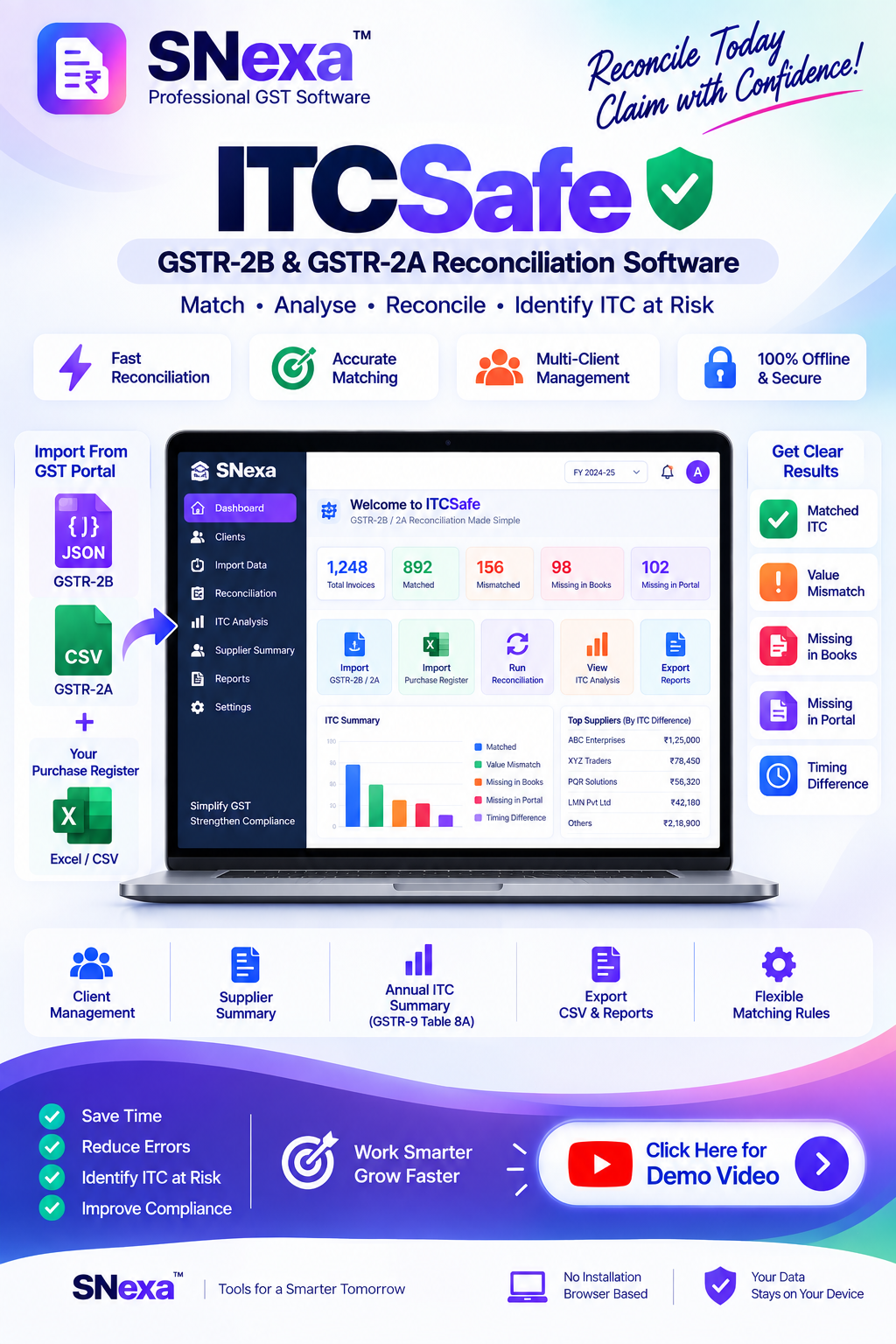
SNexa ITCSafe – GSTR-2B / 2A Reconciliation Software with ITC Matching, Supplier Follow-Up & Tally XML Export


 Self Paced Learning

- Rs. 999
Rs. 7,999- Rs. 999
- Unit price
- per
🎓 Subscribe for Free Classes & Book Reviews
Subscribe on YouTubeProduct Information
xPackage Details |
Software Access Link |
Sold & Dispatched By |
StudyNexa |
Validity |
Lifetime Access |
No. Of Views |
Unlimited |
System Requirements |
Windows,IOS & Andriod Any Device (No Internet Required) |
Delivery |
Within 48 Hours |
Brand |
StudyNexa |
Description
xSNexa • GST Reconciliation Suite
SNexa ITCSafe
GSTR-2B / GSTR-2A Reconciliation, ITC Review & Tally XML Preparation
Compare supplier-reported GST documents with your purchase register, identify missing invoices and tax differences, prepare supplier follow-ups and organise selected entries for Tally import — using an offline-first application.
GSTR-2B & GSTR-2ASmart Invoice MatchingSupplier Follow-UpsTally XML ExportLocal Browser Storage
GST reconciliation shouldn't mean endless spreadsheet checking
When purchase records and supplier-reported statements do not line up, it can take hours to find the reason behind every difference. SNexa ITCSafe helps organise this review by matching documents, separating exceptions into understandable categories and showing the figures that need attention.
See what matches
Identify invoices that match on supplier GSTIN, invoice number, taxable value and tax within your selected tolerance.
Find what needs review
Separate probable matches, value mismatches, timing differences and documents missing on either side.
Move to the next action
Prepare supplier follow-up drafts, record IMS decisions and create Tally XML files for manual import.
Common GST reconciliation problems — and how ITCSafe helps
01. Too many invoices to compare manually
Import your GSTR-2B / 2A statement and purchase register, then run document matching instead of checking every row one by one.
02. Invoice numbers are written differently
Fuzzy matching normalises common invoice-number formatting differences and can surface probable matches for your review.
03. Supplier invoices are missing in the portal
Find purchase-register entries that do not appear in the selected statement and identify suppliers who may need follow-up.
04. Entries appear in different periods
Review timing differences and load neighbouring statement months together when investigating invoices reported in another period.
05. Tax amounts do not agree
Highlight value mismatches that exceed the absolute and percentage tolerances you configure.
06. ITC availability needs attention
Identify documents marked as ITC not available in the statement and review their treatment before taking action.
07. Supplier follow-up takes extra time
Prepare follow-up message drafts for missing-in-portal documents, ready for you to review and send.
08. Reconciliation must flow into accounting
Select entries, map Tally ledgers, review checks and export XML files for manual import into TallyPrime or Tally.ERP 9.
Powerful features in one practical workflow
1GSTR-2B and GSTR-2A imports
- Import supported GSTR-2B JSON and portal Excel files.
- Read supported sheets including B2B, B2BA, B2B-CDNR, B2B-CDNRA, ISD and IMPG.
- Switch between GSTR-2B and GSTR-2A reconciliation.
- Load neighbouring statement months as spillover for period investigation.
2Purchase register import and mapping
- Import XLSX, CSV, tab-separated or semicolon-separated text.
- Automatic column-name suggestions.
- Review and correct field mappings.
- Save mappings separately for each client.
3Smart invoice matching
- Exact match using supplier GSTIN and normalised invoice number.
- Probable match using GSTIN, tax amount and date window.
- Configurable absolute and percentage tolerances.
- Separate timing differences from unmatched records.
4Clear ITC reconciliation results
- Matched documents, value mismatches and probable matches.
- Missing in books and missing in portal.
- ITC at risk, unclaimed ITC, matched ITC and net difference summaries.
- Search, filter and export reconciliation data.
5Supplier follow-up and IMS tracking
- Review supplier-wise missing documents.
- Generate supplier follow-up message drafts.
- Record accept, reject or pending IMS decisions.
- Retain decision records for later reconciliation work.
6Post to Tally — XML preparation
- Choose rows and mark Post, Hold or Ignore.
- Map party, purchase, tax and reversal ledgers.
- Review validation errors and warnings.
- Export XML files in a ZIP with instructions and posting summary.
- Options for TallyPrime and Tally.ERP 9.
7Multiple client management
- Create separate client profiles.
- Store GSTIN and contact details.
- Keep client-specific mappings and settings.
- Access saved reconciliation history and Tally batch records.
- Export an annual period-wise ITC summary.
8Local backup and restore
- Download a dated JSON backup.
- Merge or replace data during restore.
- Back up client records, reconciliations, mappings and Tally batch information.
- Keep your own secure backup copy because data is not cloud-synchronised.
Understand the six reconciliation categories
| Category | What it means | Why it matters |
|---|---|---|
| Matched | Supplier GSTIN and invoice number match, with taxable value and tax within tolerance. | Documents that agree across the two supplied records. |
| Value mismatch | Invoice is found on both sides, but amounts differ beyond tolerance. | Review the amount difference and correct the underlying record if needed. |
| Probable match | Supplier and tax amount are similar within the date window, but invoice number differs. | Check whether a typing or formatting difference explains the result. |
| Timing difference | Document is matched but recorded in a different statement period. | Understand period movement without treating it as an ordinary missing invoice. |
| Missing in books | Document appears in the statement but not in the purchase register. | Check whether a genuine purchase has not yet been recorded. |
| Missing in portal | Document appears in the purchase register but not in the statement. | Identify supplier reporting gaps and review the ITC implications. |
SNexa ITCSafe vs traditional manual reconciliation
A practical comparison with common spreadsheet-based and separate-report workflows. This is not a benchmark against a named competing product.
| Workflow | Manual spreadsheets and separate reports | SNexa ITCSafe |
|---|---|---|
| Invoice comparison | Repeated manual sorting, filtering and checking | Automated matching against imported records |
| Invoice-number variations | Manual identification of formatting differences | Normalisation and probable-match review |
| Timing differences | Often tracked in separate sheets | Separate timing-difference category |
| ITC summary | Manual formulas and cross-checks | Headline reconciliation figures |
| Supplier follow-up | Draft messages individually | Generated follow-up drafts for review |
| Client records | Separate folders and workbooks | Client profiles with saved mappings and history |
| Tally preparation | Prepare and map entries separately | Selected-entry XML export workflow |
| Data location | Depends on spreadsheet and storage setup | Local browser storage, with manual backup and restore |
How it works — from import to review
1Select a client
Create or select the client whose GST records you want to reconcile.
2Import two records
Load the GSTR-2B / 2A statement and corresponding purchase register.
3Map and configure
Confirm column mapping and choose your matching tolerances.
4Run reconciliation
Let ITCSafe classify matched documents and exceptions.
5Review and follow up
Investigate differences, prepare supplier messages and record IMS decisions.
6Export your work
Download reports or prepare selected Tally XML files for manual import.
Designed for professionals who handle GST records
Chartered Accountants
Organise recurring client-wise GST reconciliation and exception review.
GST practitioners and consultants
Identify supplier reporting gaps and prepare structured follow-up work.
Accounting and bookkeeping firms
Maintain separate client profiles, mappings and reconciliation history.
Business finance teams
Compare purchase records with supplier-reported statements and review differences.
Privacy-first, offline-first operation
Your reconciliation data stays in your browser's local storage. ITCSafe has no server, account requirement, cloud sync or network calls in its normal application operation. You control when to create and store backup files.
PIN-protected access is provided. Your PIN is not included in the backup file. Keep regular backups in a safe location and avoid clearing browser site data before backing up.
Frequently asked questions
Tap any question to expand the answer.
Does ITCSafe support both GSTR-2B and GSTR-2A?
Yes. Select the statement type you want to reconcile. GSTR-2A is dynamic, while GSTR-2B is the read-only auto-drafted statement used for monthly review.
Can I import the GSTR-2B Excel downloaded from the GST portal?
Yes. Supported GSTR-2B Excel sheets are read sheet by sheet. JSON is the most complete source in the application because it carries the GST rate for each item.
Which purchase register formats are supported?
XLSX, CSV, tab-separated text and semicolon-separated text. Save older XLS workbooks as XLSX before importing.
Does ITCSafe automatically file GSTR-3B or GSTR-9?
No. It is a reconciliation and preparation aid. You must review the results and complete filing separately through the GST portal or your usual filing process.
Does it directly connect to the GST portal or IMS?
No. It does not connect to the portal. IMS decisions recorded in the application are for internal tracking; you must also take the relevant action on the GST portal.
Does Post to Tally enter vouchers automatically?
No. ITCSafe creates XML files for manual import into Tally. Review the files and take a backup of your Tally company before importing. It does not connect over ODBC or a port, and it does not create inventory vouchers.
Can I manage multiple clients?
Yes. Client profiles retain their own contact information, mappings, settings and reconciliation history.
What happens if I change my computer or browser?
Create a backup first, then copy the backup file to the new device and use the restore function. Your data does not automatically move between browsers or devices.
What if I lose my PIN or clear browser data?
Keep regular backups and protect your PIN. Clearing browser site data can remove locally stored records. The application has no cloud copy to recover them automatically.
Product specifications
| Product name | SNexa ITCSafe |
| Product category | GST Reconciliation Software |
| Application type | Offline browser-based application |
| Statement support | GSTR-2B and GSTR-2A |
| Portal import formats | Supported JSON and XLSX formats |
| Purchase register formats | XLSX, CSV, tab-separated and semicolon-separated text |
| Accounting export | Tally XML files for manual import |
| Storage | Local browser storage |
| Internet requirement | Not required for normal application operation |
| Data backup | Manual JSON backup and restore |
Important scope and usage notice: SNexa ITCSafe is a GST reconciliation and preparation aid, not a substitute for professional judgement, statutory verification or tax advice. Results depend on the accuracy and completeness of the files supplied. The application does not file returns, connect to the GST portal, verify GSTINs against the portal, decide ITC eligibility on your behalf, execute IMS actions online or directly post to Tally. Review every result and accounting entry before acting or filing.
Make GST reconciliation more organised with SNexa ITCSafe
Match records. Find exceptions. Follow up with suppliers. Prepare your Tally import files — with a workflow that stays on your device.
SNexa ITCSafe — Reconcile with clarity. Review with confidence.


