


SNexa GSTR9Ready FY 2025-26 – GSTR-9 Preparation & ITC Reconciliation Software


- Rs. 999
Rs. 7,999- Rs. 999
- Unit price
- per
🎓 Subscribe for Free Classes & Book Reviews
Subscribe on YouTubeProduct Information
xPackage Details |
Software Access Link |
Sold & Dispatched By |
StudyNexa |
Validity |
Lifetime Access |
No. Of Views |
Unlimited |
System Requirements |
Windows,IOS & Andriod Any Device (No Internet Required) |
Delivery |
Within 48 Hours |
Brand |
StudyNexa |
Description
xSNexa GST Compliance Software
SNexa GSTR9Ready
GSTR-9 Preparation & Reconciliation Software — FY 2025-26
Prepare, reconcile and review your GSTR-9 annual return using GSTR-2B, GSTR-1 / GSTR-1A, GSTR-3B figures and Table 8A document details — with document-level checks, ITC reconciliation and supplier follow-up analysis.
GSTR-9 FY 2025-26 Table 8A ITC Reconciliation Tables 4–14 Excel Export Offline
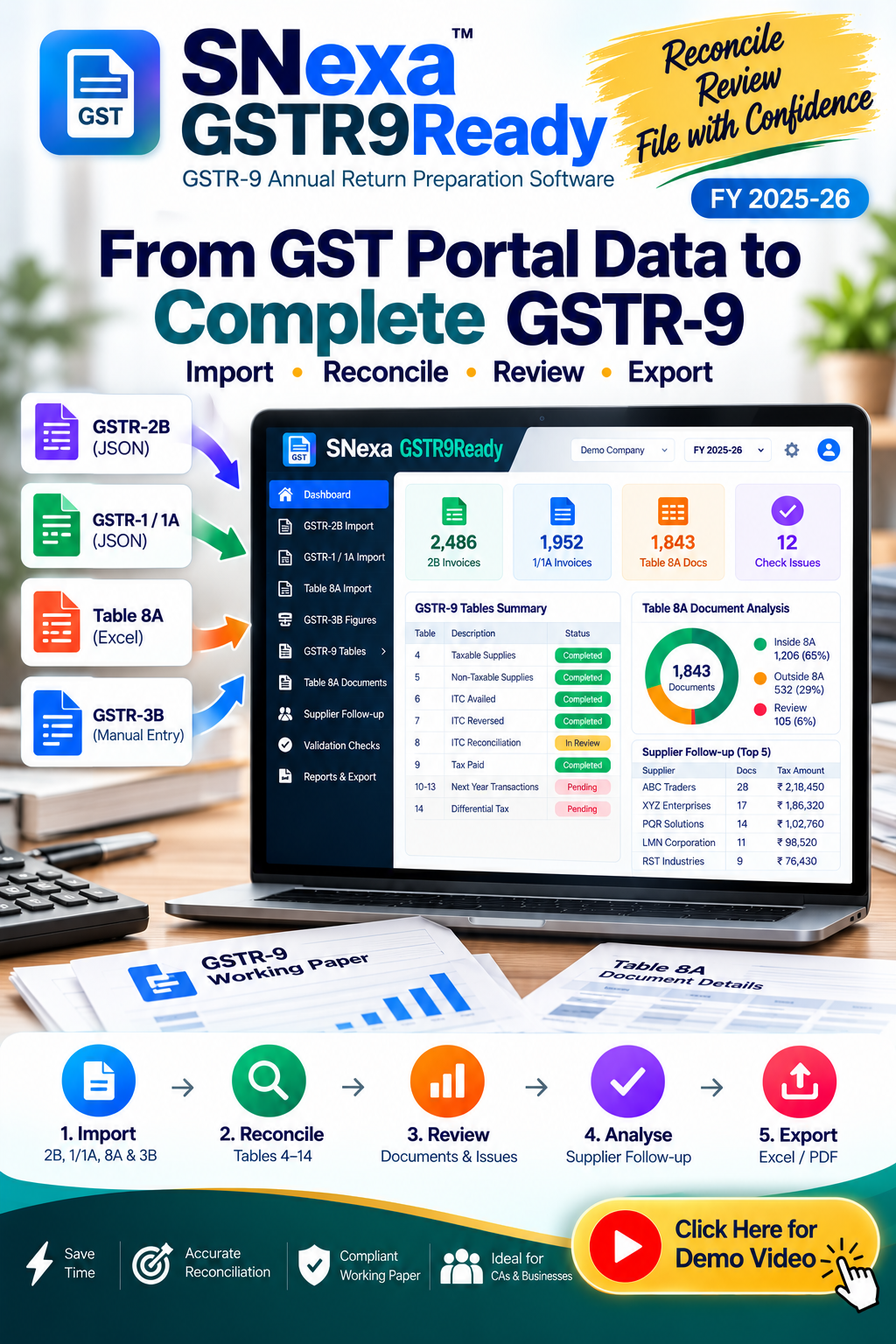
From GST Portal Downloads to a Structured GSTR-9 Working Paper
SNexa GSTR9Ready brings together the major data inputs required for annual GSTR-9 preparation and reconciliation. Load your portal downloads, enter the required GSTR-3B figures, review the annual tables and run document-level checks before using the final figures for filing.
GSTR-2B
+
GSTR-1 / 1A
+
GSTR-3B
+
Table 8A
→
GSTR-9 Working Paper
Key Benefits of SNexa GSTR9Ready
Designed to make annual GST reconciliation more structured, traceable and easier to review.
📥
Centralise Your Data
Bring GSTR-2B, GSTR-1/1A, Table 8A and GSTR-3B figures into one annual return workflow.
🔍
Reconcile Table 8A
Review the treatment of individual documents under the Table 8A window rule.
📋
Review Tables 4–14
Work through outward supplies, ITC, reconciliation, tax paid and next-year spillover.
✓
Built-in Checks
Review validation checks and see what needs attention before filing.
🏢
Supplier Follow-up
Identify suppliers with credit sitting outside Table 8A for follow-up.
📄
Document-Level Visibility
See GSTIN, supplier, document, date, FY, 2B period, taxable value, tax and treatment.
📊
Excel Working Paper
Export a structured workbook containing Table 8, Checks, Documents and supplier follow-up.
🔒
Offline-First
The application runs on your machine without uploading the working data or using GST portal login.
How SNexa GSTR9Ready Works
1️⃣
Import
Load GSTR-2B JSON, GSTR-1/1A JSON and Table 8A document details.
2️⃣
Enter
Enter the required GSTR-3B figures for the financial year.
3️⃣
Prepare
Review Tables 4, 5, 6, 7, 8 and 9–14.
4️⃣
Check
Run validation checks and inspect document-level treatment.
5️⃣
Export
Export the working paper to Excel or print/save it as PDF.
Supported Data Inputs
SNexa GSTR9Ready is designed around the files and figures required by its annual reconciliation workflow.
📥 GSTR-2B JSON
Load monthly GSTR-2B JSON files for the financial year.
📅 Next-Year 2B
Load April to October of the following year so the Table 8A window can be applied correctly.
📤 GSTR-1 / 1A JSON
Load outward-supply data used for Tables 4 and 5.
📑 Table 8A Excel
Import the Excel downloaded from Annual Return → Download Table 8A Document Details.
🧾 GSTR-3B Figures
Enter the required monthly figures because the portal does not provide a clean GSTR-3B JSON input for this workflow.
Complete GSTR-9 Tables Covered
Table 4 — Taxable Supplies
Supplies on which tax is payable, including taxable value and tax components.
Table 5 — Non-Taxable Supplies
Supplies on which tax is not payable.
Table 6 — ITC Availed
Split ITC claimed during the year by source.
Table 7 — ITC Reversed
Enter and review ITC reversals.
Table 8 — ITC Reconciliation
Reconcile ITC using derived and user-entered figures.
Table 8A Document Analysis
Apply the Table 8A window rule document by document.
Table 9 — Tax Paid
Review tax payable, cash payment, ITC payment, total paid and balance.
Tables 10–13
Review this year's transactions declared or claimed in the following year's returns through October.
Table 14
Review differential tax relating to Tables 10 and 11.
Detailed Table 8A Document-Level Reconciliation
One of the key workflows in SNexa GSTR9Ready is the document-level view of Table 8A treatment. The software shows each document and the reason it sits inside or outside Table 8A.
| Information | Available in Document View |
|---|---|
| GSTIN | Supplier GSTIN |
| Supplier | Supplier name |
| Document | Document number |
| Date | Document date |
| Document FY | Financial year classification |
| 2B Period | Statement period |
| Taxable Value | Taxable amount |
| Treatment | Whether and why the document is inside or outside Table 8A |
Supplier Follow-Up Analysis
The Suppliers section ranks suppliers by credit sitting outside Table 8A, providing a practical follow-up list with the largest exposure first.
GSTIN
Supplier identification
Documents
Number of documents
Outside 8A
Documents outside the window
Exposure
Tax exposure for review
Built-In Validation & Review Checks
The Checks section is designed to show what must tie out or be reviewed before the annual return is finalised.
✓ Validation Status
Review validation results and focus on problems requiring attention.
✓ Table 8A Window
Review how each document was treated under the Table 8A window rule.
✓ Document Treatment
Understand why a document sits inside or outside Table 8A.
✓ Problem Filtering
Focus your review on validation issues instead of scanning everything manually.
Export Your GSTR-9 Working Paper
📗
Excel Workbook
Export four working sheets: Table 8, Checks, Documents with treatment and supplier follow-up list.
🖨️
Print / Save as PDF
Generate a print-ready Table 8 working paper with checks and the rule applied.
💾
Save Working File
Save a portable working file to move the work to another machine or share with a colleague.
SNexa GSTR9Ready vs Manual GSTR-9 Preparation
A workflow comparison showing how the software structures the annual reconciliation process.
| Area | Manual Preparation | SNexa GSTR9Ready |
|---|---|---|
| Data Collection | Collect files and figures separately | Dedicated annual import workflow |
| GSTR-2B | Manual review of monthly files | Load monthly GSTR-2B JSON files |
| Next-Year Spillover | Track separately | April–October following-year window supported |
| GSTR-1 / 1A | Manually consolidate data | Load JSON files for Tables 4 and 5 |
| Table 8A | Manual document review | Document-level treatment view |
| Tables 4–14 | Maintain separate working papers | Structured sections inside one application |
| ITC Reconciliation | Manual reconciliation sheets | Dedicated Table 6, 7 and 8 workflow |
| Document Analysis | Search/filter spreadsheets manually | Dedicated searchable Documents section |
| Supplier Follow-Up | Prepare separate follow-up list | Supplier exposure list ranked for follow-up |
| Validation | Manual checking across worksheets | Dedicated Checks section |
| Working Paper | Create and format manually | Excel workbook + print-ready working paper |
| Data Location | Depends on your chosen tools | Runs inside the file on your machine |
Complete Feature Comparison
| Feature | Included | Details |
|---|---|---|
| GSTR-2B Monthly JSON | ✓ | Load monthly GSTR-2B files |
| Following-Year 2B | ✓ | April–October for Table 8A window |
| GSTR-1 JSON | ✓ | Outward supplies for Tables 4 and 5 |
| GSTR-1A JSON | ✓ | Include amendments where applicable |
| Table 8A Excel | ✓ | Annual Return → Download Table 8A Document Details |
| GSTR-3B Figures | ✓ | Manual monthly entry |
| Table 4 | ✓ | Supplies on which tax is payable |
| Table 5 | ✓ | Supplies on which tax is not payable |
| Table 6 | ✓ | ITC availed |
| Table 7 | ✓ | ITC reversed |
| Table 8 | ✓ | ITC reconciliation |
| Table 9 | ✓ | Tax paid |
| Tables 10–13 | ✓ | Following-year declarations/claims through October |
| Table 14 | ✓ | Differential tax |
| Table 8A Document View | ✓ | Document-level treatment and reason |
| Supplier Analysis | ✓ | Credit outside Table 8A and exposure |
| Validation Checks | ✓ | Review issues before filing |
| Excel Export | ✓ | Four-sheet working workbook |
| PDF Working Paper | ✓ | Print/save through browser |
| Portable Working File | ✓ | Save and move work between machines |
| Offline Workflow | ✓ | Runs inside the file on your machine |
Who Should Use SNexa GSTR9Ready?
👨💼 Chartered Accountants
Prepare structured GSTR-9 working papers for clients.
🏢 CA Firms
Maintain annual reconciliation workflows across GST clients.
📊 GST Practitioners
Review ITC, Table 8A documents and annual return figures.
💼 Tax Professionals
Organise annual GST reconciliation and client working papers.
🏭 Businesses
Review annual GST data before handing it to the tax professional.
📑 Accounts Teams
Prepare supporting data and reconciliation files for annual return review.
Offline-First & No GST Portal Login
Everything runs inside the application file on your machine. The product does not upload your working data and does not use a GST portal login.
✓ Runs on your machine ✓ No portal login ✓ Offline workflow ✓ Working-file backup
Important Information Before Purchase
- SNexa GSTR9Ready prepares and reconciles; it does not file the GSTR-9.
- The software does not connect to the GST portal.
- It does not verify GSTINs against a government API. GSTIN and PAN checks are checksum-level and offline.
- Every figure should be reviewed against the GST portal and your books before filing.
- GSTR-9, once filed, cannot be revised, so final review is important.
Frequently Asked Questions
Prepare Your FY 2025-26 GSTR-9 With a Structured Reconciliation Workflow
Bring together GSTR-2B, GSTR-1/1A, GSTR-3B and Table 8A data, review Tables 4–14, analyse document treatment, identify supplier follow-ups, run checks and export your working papers.
Get SNexa GSTR9Ready


