


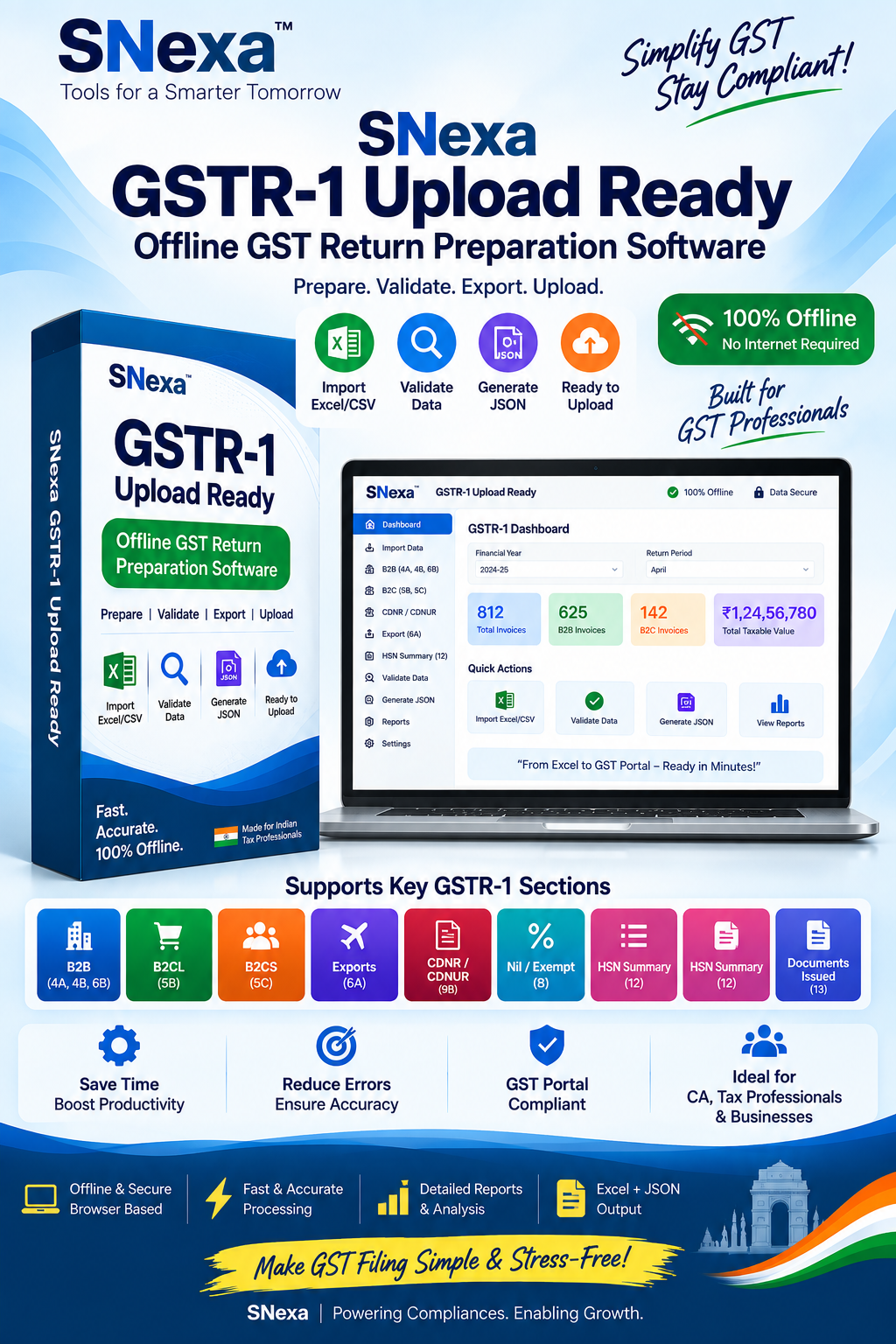
SNexa GSTR-1 Upload Ready – Offline GST Return Preparation Tool


- Rs. 999
Rs. 7,999- Rs. 999
- Unit price
- per
🎓 Subscribe for Free Classes & Book Reviews
Subscribe on YouTubeProduct Information
xPackage Details |
Software Access Link |
Sold & Dispatched By |
StudyNexa |
Validity |
Lifetime Access |
No. Of Views |
Unlimited |
System Requirements |
Windows,IOS & Andriod Any Device (No Internet Required) |
Delivery |
Within 48 Hours |
Brand |
StudyNexa |
Description
xSNexa GST Compliance Utility
SNexa GSTR-1 Upload Ready
Offline GST Return Preparation Tool
Prepare your GSTR-1 data from Excel or CSV, map your sales register, validate important fields, review GSTR-1 sections and generate GSTR-1 JSON + Excel files for the GST Portal's Prepare Offline workflow.
✓ Excel / CSV Import ✓ Data Validation ✓ GSTR-1 Sections ✓ JSON + Excel Export ✓ Offline Workflow
Simplify Your GSTR-1 Preparation Workflow
SNexa GSTR-1 Upload Ready is designed for professionals and businesses that maintain their sales data in Excel or CSV and need a structured way to prepare GSTR-1 upload files.
Instead of manually organizing spreadsheet data for different GSTR-1 categories, follow a simple workflow: Upload → Map → Validate → Review → Export.
Professional GSTR-1 Data Preparation
Convert your sales register into structured GSTR-1 data, review the applicable sections and generate files that can be taken to the GST Portal's Prepare Offline process.
Complete GSTR-1 Preparation Workflow
A simple step-by-step process from your sales register to upload-ready files.
📊
01. Upload
Excel / CSV
→
🧩
02. Map
Columns & Fields
→
✓
03. Validate
Check Data
→
🔎
04. Review
GSTR-1 Sections
→
📦
05. Export
JSON + Excel
Powerful Features for GSTR-1 Preparation
Everything you need to organize, validate and prepare your supported GSTR-1 data.
📥
Excel / CSV Import
Import your existing sales register directly from Excel or CSV and use it as the starting point for GSTR-1 preparation.
🧩
Column Mapping
Map your spreadsheet headers to the fields required by the GSTR-1 preparation workflow.
🔄
Data Normalisation
Structure imported invoice information into the standardized fields required by the preparation process.
🛡️
Validation Engine
Validate important structural and arithmetic information before allowing records to move toward export.
🚨
Error Detection
Clearly identify rows containing issues so they can be corrected before generating the export.
📋
Section Builder
Organize valid records into the supported GSTR-1 tables based on supply type and applicable data.
🔢
HSN Summary
Build the supported HSN summary from outward supply data and apply the applicable HSN digit validation rule.
📑
Documents Issued
Prepare supported document-series information as part of the GSTR-1 preparation workflow.
🔍
Review Before Export
Review section-wise data before downloading your JSON and Excel files.
📄
JSON Export
Generate a GSTR-1 JSON file for use with the GST Portal's Prepare Offline workflow.
📊
Excel Export
Generate a matching Excel workbook for review, checking and record-keeping.
🧾
Error Report
Download identified validation issues as a CSV report for easier correction of source records.
📌 Supported Sales Register Fields
Map your existing spreadsheet columns to the fields used by the GSTR-1 preparation workflow.
Supply Type Invoice / Note No. Invoice Date Buyer GSTIN Buyer Name Place of Supply Taxable Value Tax Rate Invoice Value Reverse Charge HSN / SAC Item Description UQC Quantity Credit / Debit Note Export Type
Required core fields: Supply type, invoice/note number, invoice/note date, place of supply, taxable value, tax rate and HSN/SAC. Buyer GSTIN is required for applicable B2B and CDNR records. :contentReference[oaicite:0]{index=0}
GSTR-1 Tables & Sections Supported
Valid records are organized into the supported GSTR-1 sections before export.
🏢
B2B
Table 4 — Registered Buyers
🛍️
B2CL
Table 5 — Large B2C
🧾
B2CS
Table 7 — Small B2C
🌍
Exports
Table 6 — With / Without Payment
↩️
CDNR / CDNUR
Table 9B — Credit / Debit Notes
0️⃣
Nil / Exempt
Table 8 — Nil / Exempt / Non-GST
🔢
HSN Summary
Table 12
📑
Documents Issued
Table 13
📚 Supported Supply Types
B2B
Supplies to GST-registered buyers.
B2CL
Supported large inter-state B2C category.
B2CS
Other unregistered supplies summarized by state and rate.
CDNR
Credit/debit notes for registered buyers.
CDNUR
Credit/debit notes for unregistered buyers.
EXP_WPAY
Export supplies with payment of tax.
EXP_WOPAY
Export supplies without payment of tax.
NIL / EXEMPT / NON-GST
Supported nil-rated, exempt and non-GST supply categories.
🛡️ Validation Before Export
Don't rush directly from spreadsheet to upload. First validate your data and resolve the issues identified by the tool.
✓ Invoice / Note Number
✓ Invoice / Note Date
✓ GSTIN Format
✓ Place of Supply
✓ Taxable Value
✓ Tax Rate
✓ HSN / SAC
✓ Invoice Value
✓ Supply Type
✓ Required Field Checks
✓ Structural Checks
✓ Arithmetic Checks
Validation-first workflow: flagged rows are excluded from the export until the identified issues are corrected. :contentReference[oaicite:1]{index=1}
🚨 Identify & Fix Data Issues
Flagged Rows
Quickly identify the row and invoice associated with a validation issue.
Issue Details
Review the specific issue identified by the validation process before correcting your source data.
CSV Error Report
Download the identified errors as a CSV report for convenient review.
🔢 HSN Digit Validation
Enter the previous year's turnover on the Dashboard so the validator can apply the configured HSN digit rule during preparation.
₹
Above ₹5 Crore
6-digit HSN
✓
₹5 Crore or Below
4-digit HSN
📦 Export Your GSTR-1 Preparation Files
Once validation and review are complete, generate the supported output files.
📄
GSTR-1 JSON
Generate the JSON file intended for the GST Portal's Prepare Offline upload workflow.
📊
Matching Excel
Generate a corresponding Excel workbook for checking, reconciliation and record-keeping.
🚨
Error CSV
Download identified validation errors for easier correction of source records.
⭐ Why Choose SNexa GSTR-1 Upload Ready?
Built around the practical workflow followed by professionals who prepare GSTR-1 from spreadsheet-based sales data.
⚡ Faster Preparation
Start from your existing Excel or CSV instead of manually rebuilding your sales data for the preparation workflow.
🧩 Structured Mapping
Create a clear connection between your source spreadsheet columns and GSTR-1 preparation fields.
🛡️ Validate First
Catch supported structural and arithmetic issues before generating the export files.
🔎 Review Control
Review how valid records are organized into GSTR-1 sections before taking the files to the portal.
📄 Dual Output
Generate JSON for the portal workflow and Excel for review and documentation.
💻 Offline Workflow
Prepare your data locally in the browser without sending uploaded data to an external service.
📋 Professional Control
Keep the preparation process organized from source data through validation, review and export.
🎯 Transparent Workflow
Clearly see what the tool prepares and what still needs to be completed on the GST Portal.
🚀 Key Benefits for GST Professionals
Turn spreadsheet-based GSTR-1 preparation into a more structured, repeatable professional workflow.
⏱️ Save Preparation Time
Reduce repetitive spreadsheet arrangement and section-wise preparation work.
📊 Handle Spreadsheet Data
Start with the Excel or CSV sales register already maintained by your business or client.
🛡️ Reduce Avoidable Issues
Run supported validation checks before generating your output.
🔎 Review Before Upload
Review the generated sections and output before using the GST Portal.
📄 Maintain Excel Records
Keep a matching Excel output alongside the generated JSON.
💻 Work Offline
Keep the preparation process local to the browser and device.
📑 Better Documentation
Use exported Excel and error reports for internal review and documentation.
🎯 Repeatable Process
Follow the same Upload → Map → Validate → Review → Export process for recurring preparation work.
⚖️ Manual GSTR-1 Preparation vs SNexa
See how a structured preparation workflow can simplify spreadsheet-based work.
👥 Who Is SNexa GSTR-1 Upload Ready For?
Ideal for professionals and businesses preparing GSTR-1 data from spreadsheet-based sales registers.
👨💼
Chartered Accountants
📑
GST Practitioners
💼
Tax Consultants
🧾
Accountants
🏢
Businesses & MSMEs
📊
Finance Teams
💼 Practical Use Cases
Client Sales Register → GSTR-1
Receive a client's sales register in Excel/CSV, map the fields, validate the records and prepare the supported GSTR-1 output.
Monthly Return Preparation
Follow the same structured workflow for recurring GSTR-1 preparation across return periods.
Spreadsheet Data Review
Validate important invoice fields and download an error report before moving the data toward portal upload.
Pre-Upload Checking
Review generated sections and keep a matching Excel output before uploading the JSON on the GST Portal.
🛠️ How to Use SNexa GSTR-1 Upload Ready
1
Enter GSTIN, turnover & return period
Set up the preparation period and relevant business information.
2
Upload Excel / CSV
Import your sales register with one row per invoice line.
3
Map your columns
Match your spreadsheet headings with the required preparation fields.
4
Validate your records
Fix flagged records and run validation again where required.
5
Review GSTR-1 sections
Check how valid records have been grouped into supported tables.
6
Export JSON + Excel
Download the generated files.
7
Upload through GST Portal → Prepare Offline
Take the generated JSON to the GST Portal and complete the return process there.
🔐 Offline & Local Data Preparation
Your uploaded data, mappings and results remain within the browser/device workflow rather than being sent to an external service.
✓ Local Browser Processing
✓ No External Data Sending
✓ Offline Preparation Workflow
✓ Excel / CSV Based
📦 What You Get
Excel / CSV Import
Import sales register data.
Column Mapping
Map source fields to GSTR-1 fields.
Validation
Check supported data issues.
Section Review
Review supported GSTR-1 tables.
JSON Export
Prepare JSON for portal workflow.
Excel Export
Matching Excel output.
Error CSV
Download validation issues.
Offline Workflow
Local browser-based preparation.
⚠️ Important Product Information
SNexa GSTR-1 Upload Ready is a preparation tool. It generates GSTR-1 JSON and Excel files; it does not automatically file your return or communicate directly with the GST Portal.
The generated JSON is uploaded manually through the GST Portal's Prepare Offline process. The portal remains the final authority for acceptance of the uploaded file.
Validation checks the supported structure and arithmetic of the imported data. It does not independently confirm that a GSTIN is active or determine the correct tax treatment for your business.
This version does not handle amendments, e-commerce operator supplies in Tables 14/15 or advances in Table 11. Where applicable, those items need to be handled directly on the GST Portal.
❓ Frequently Asked Questions
Can I import Excel data?
Yes. The tool accepts Excel or CSV sales-register data.
Does it generate GSTR-1 JSON?
Yes. The tool generates a GSTR-1 JSON file for the Prepare Offline workflow.
Does it automatically file GSTR-1?
No. You upload the generated JSON manually on the GST Portal and complete filing there.
Can I review errors?
Yes. Flagged rows and identified issues can be reviewed, with an error report available as CSV.
Does it create an Excel output?
Yes. A matching Excel workbook is generated along with the JSON output.
Does it work offline?
Yes. The product is designed around local, browser-based preparation.
Professional GSTR-1 Preparation
Stop Manually Preparing Every GSTR-1 File
Import your Excel or CSV sales register, map your data, validate the records, review the supported GSTR-1 sections and generate JSON + Excel files through one structured offline workflow.
EXCEL / CSV → MAP → VALIDATE → REVIEW → JSON + EXCEL → GST PORTAL
SNexa GSTR-1 Upload Ready — Offline GST Return Preparation Tool


