


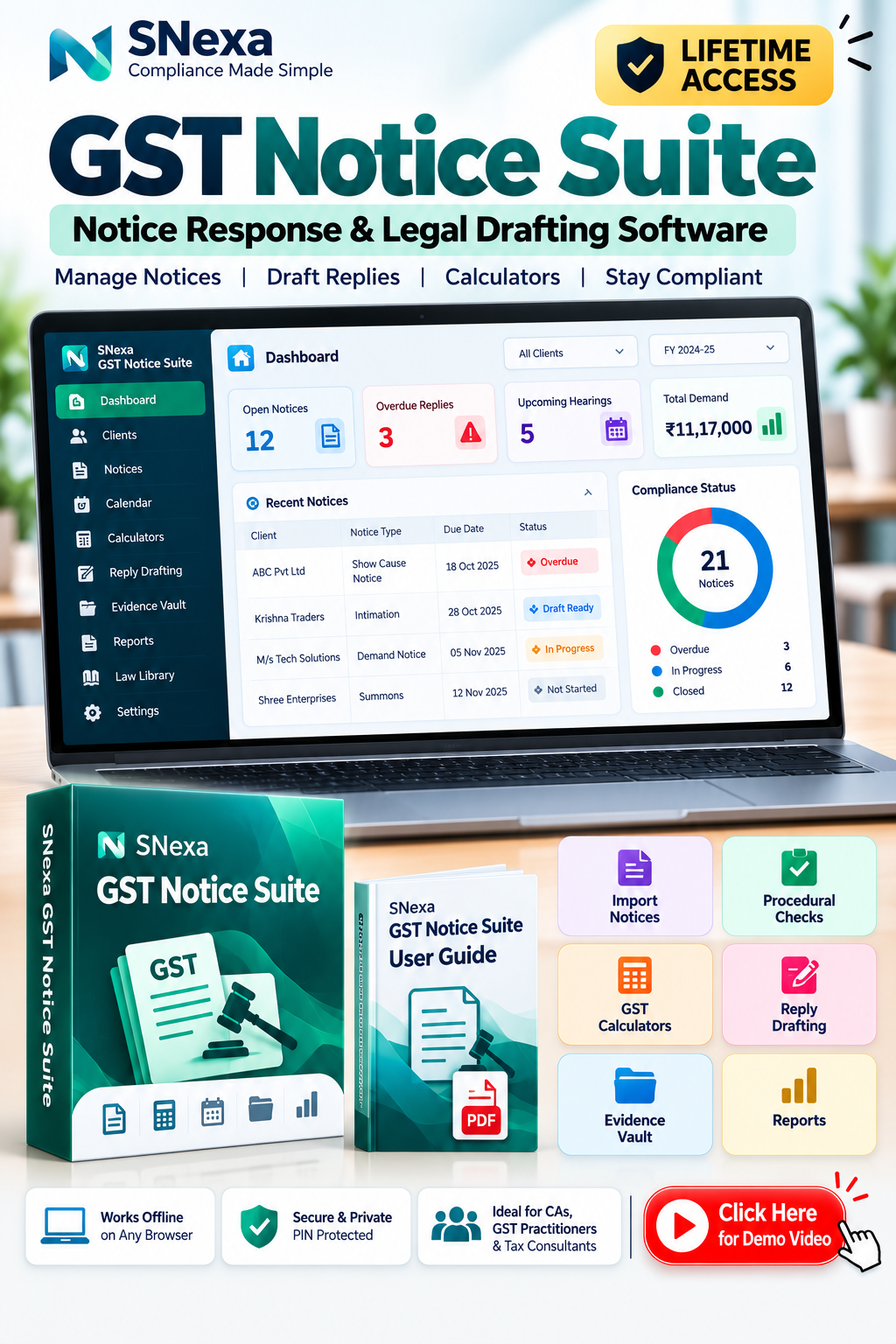
SNexa GST Notice Suite – GST Notice Response, Legal Drafting, Procedural Checks & GST Calculators Software


 Self Paced Learning

- Rs. 899
Rs. 5,999- Rs. 899
- Unit price
- per
🎓 Subscribe for Free Classes & Book Reviews
Subscribe on YouTubeProduct Information
xPackage Details |
Software Access Link |
Sold & Dispatched By |
StudyNexa |
Validity |
Lifetime Access |
No. Of Views |
Unlimited |
System Requirements |
Windows,IOS & Andriod Any Device (No Internet Required) |
Delivery |
Within 48 Hours |
Brand |
StudyNexa |
Description
xManage GST Notices with a More Organised Workflow
An offline workspace for GST practitioners to manage clients and notices, review procedural issues, calculate estimates, draft replies, organise supporting evidence and track deadlines—all from one HTML application on your device.
✓ Offline application✓ Notice import & extraction✓ Guided reply drafting✓ GST calculators✓ Evidence vault & reports
12Rule-based procedural checks
10GST calculators
34Law-library references
8Letter templates
What is SNexa GST Notice Suite?
SNexa GST Notice Response & Legal Drafting Suite is a browser-based offline application designed to help GST professionals manage notice-related work. It brings client records, notice details, reply deadlines, procedural checks, calculations, legal-reference tracking, draft replies, letters, supporting documents and reports into one local workspace.
Built for professional preparation: The suite helps organise information and create editable drafts. It does not automatically file replies with a tax department. Calculations and legal references must be verified before professional use.
Key benefits for GST practitioners
Practical benefits based on the documented software workflow.
📂
Keep clients and notices together
Maintain client details, PAN, GSTINs and linked notices, documents and drafts. Import client lists through CSV to organise multiple matters.
📥
Import and review notice details
Import a PDF, image, DOCX or pasted text. Review extracted form type, notice number, DIN, GSTIN, sections, periods, dates and amounts before saving.
🧭
Review possible procedural issues
Run 12 rule-based checks covering limitation, DIN, section versus form, hearing, arithmetic and other supported checks. Professionally review each potential issue before using it as an objection.
✍️
Build structured reply drafts
Follow a 16-step reply wizard covering facts, allegations, procedural objections, issue guides, reconciliation, annexures, legal references, prayer and signatory details.
⏰
Track deadlines and hearings
Use calendar and deadline views for reply dates, hearings and follow-ups. Export events to compatible calendar apps using an .ics file.
🗃️
Organise supporting evidence
Store notices, GST returns, invoices, ledgers, reconciliation reports, supporting evidence, drafts, acknowledgements and orders with annexure numbering and version history.
🧮
Use ten GST calculators
Calculate estimates for interest, limitation dates, penalty scenarios, appeal pre-deposit, late fees, demand reconciliation, period-wise liability, ITC differences, payments/outstanding and deadlines.
📊
Prepare reports for matter management
Generate reports for pending notices, overdue deadlines, upcoming hearings, client-wise history, notice types, demand and payments, missing evidence and drafts awaiting approval.
🔐
Work offline with local protection
The app runs locally without an account or server. Optional PIN-based encryption protects stored records in that browser, and password-protected backups can move data between computers.
📚
Review legal-reference status
Use 34 references with source links, effective dates, amendments and verification labels. Add or edit references and parameters when appropriate, then verify current law before use.
How the workflow works
From receiving a notice to preparing a reviewed response.
1. Add client
PAN and GSTIN details
PAN and GSTIN details
→
2. Import notice
PDF, image, DOCX or text
PDF, image, DOCX or text
→
3. Review data
Confirm uncertain values
Confirm uncertain values
→
4. Check & calculate
Checks and estimates
Checks and estimates
→
5. Draft & review
Link supporting evidence
Link supporting evidence
→
6. Export
Word or Print / Save PDF
Word or Print / Save PDF
The practitioner remains responsible for checking extracted facts, verifying law and calculations, reviewing the reply and filing through the appropriate official channel.
Features explained in simple terms
📥 Notice import and extraction
Import text PDFs, scanned PDFs, JPG/PNG/WEBP images, Word DOCX files or pasted text. The guide specifies a 25 MB file limit, the first 40 PDF pages, and OCR reading for up to 15 scanned pages in English. Extracted values show confidence and source text; medium/low values must be confirmed or corrected before saving.
🧾 Notice records and procedural checks
Track status, priority, assignee, dates, demand, payments, history, documents and drafts. Run 12 rule-based checks; each result explains facts examined, provision, source status, reasoning and next action.
📝 Reply drafting wizard
Use a 16-step guided process and 24 issue guides. Assemble an editable reply with source tags for notice information, user-provided facts, calculations, legal references, templates and suggested wording. Missing facts appear as placeholders for confirmation.
✉️ Eight letter templates
Templates cover adjournment, extension of time, relied-upon documents, authorisation, rectification under section 161, personal hearing, additional submission, and appeal-related intimation with stay of recovery.
🗂️ Evidence vault and annexures
Organise documents by client and notice. Assign annexure numbers, retain older versions, link evidence to reply paragraphs, and export an annexure index to Word, CSV or Print/PDF.
📆 Calendar and deadlines
View reply dates, hearings and follow-ups in a monthly calendar with client and type filters. Export .ics events to Google, Outlook or Apple Calendar, with optional reminders.
🧮 Ten calculators
- Interest under section 50
- Limitation dates
- Penalty scenarios
- Appeal pre-deposit
- Late fee
- Tax-demand reconciliation
- Period-wise liability
- ITC difference
- Payments and outstanding demand
- Deadline and remaining days
Results are labelled estimates, not official figures.
📚 Law library and parameters
Browse 34 references covering sections, rules, notifications, circulars and judgments, with source links, effective dates, amendments and check status. Edit rule parameters with a recorded reason; independently verify current official sources.
📊 Eight reports
- Pending notices
- Overdue deadlines
- Upcoming hearings
- Client-wise matter history
- Notice-type report
- Tax-demand and payment summary
- Missing-evidence report
- Drafts awaiting approval
Filter by client, financial year, period or scope and export to CSV, Excel, Word on letterhead or Print/PDF.
🔐 Security, backup and restore
Set a PIN to encrypt stored records and documents using AES-256-GCM. Create password-protected backups, optionally include documents, restore to another computer and export selected data as CSV. Keep backups safe and remember the PIN/password: the app cannot recover them.
Comparison: manual scattered work vs. one organised workspace
A workflow comparison; actual benefits depend on each practitioner's existing process.
| Work requirement | Separate files and manual tracking | With SNexa GST Notice Suite |
|---|---|---|
| Client and notice records | May be spread across spreadsheets, folders and documents | ✓ Client records and linked notice matters in one local app |
| Notice data entry | Details may need manual transcription | ✓ Import and extraction with review of uncertain values |
| Procedural review | Checks may be tracked in personal notes | ✓ 12 rule-based checks with reasoning and review status |
| Reply preparation | Draft structure may need to be built from scratch | ✓ 16-step wizard, issue guides and editable source-tagged draft |
| Evidence and annexures | Files and references may be maintained separately | ✓ Evidence vault, numbering, version history and paragraph links |
| Calculations | May require separate spreadsheets or calculators | ✓ 10 calculators with inputs, assumptions and estimate labels |
| Deadlines and hearings | May be tracked in separate calendars | ✓ Calendar, deadline lists and .ics export |
| Reporting | Summaries may need manual assembly | ✓ Eight report types with filters and export options |
| Data portability | Files may be copied separately | ✓ Backup/restore and CSV exports |
Who is it for?
👨💼
Chartered Accountants
Organise GST notice matters, evidence, calculations, draft replies and deadlines.
⚖️
Tax Practitioners & Advocates
Review procedural points, prepare working drafts, link evidence and manage correspondence.
🏢
GST Consultants & Firms
Maintain client records and reports across multiple notice matters in a local workspace.
What you receive
💻
SNexa GST Notice Suite software
One HTML application file designed to run locally in a supported browser on Windows, macOS or Linux.
📘
User Guide PDF
Step-by-step instructions for setup, licence activation, notices, reply drafting, calculators, evidence, reports, security, backup and troubleshooting.
Setup and activation
1. Save HTML file
Keep in a permanent folder
Keep in a permanent folder
→
2. Open in Chrome or Edge
Normal browser window
Normal browser window
→
3. Activate licence
Send Device ID if prompted
Send Device ID if prompted
→
4. Set PIN & start
Add clients and back up
Add clients and back up
The User Guide says the licence is tied to the browser profile on the computer. A new computer, different browser or cleared site data may create a new Device ID and require a replacement key from the seller. Avoid private/incognito mode, keep the app file in its original folder and download regular backups.
Frequently asked questions
Does the software work offline?
Yes. It is designed to run locally in Chrome or Edge without an account, server or internet connection after the file is available on your device.
Does it automatically file GST replies?
No. It helps organise records, prepare drafts and export documents. You must review the reply and file it through the appropriate official channel yourself.
Does the software provide legal or tax advice?
No. It is a drafting and tracking aid. Every reply must be reviewed by a CA or advocate before filing, and legal references should be checked against current official sources.
Are the calculations official?
No. Calculations are estimates based on the inputs and parameters used. They do not replace official portal calculations, departmental orders or professional verification.
Does it use AI to write replies?
The User Guide states that drafting wording comes from templates and guides, not AI. The reply remains editable and requires professional review.
Can I import scanned notices?
Yes. The guide describes OCR for up to 15 scanned pages in English, with a 25 MB file limit and the first 40 pages of a PDF considered. Extraction accuracy depends on document quality; review all extracted values, especially medium- and low-confidence values.
What if I forget my PIN?
The PIN cannot be recovered. The guide says to erase app data and restore a backup. Keep the PIN and backup password safe.
Is data synced between devices?
No. Data is stored locally in the browser associated with the app file. Use backup and restore to move data. Exported Word, PDF and CSV files are not encrypted by the app.
Are all legal references verified and current?
The law library shows verification status for each reference. The guide warns that legal content is not a substitute for current official text; update parameters and references when the law changes.
Organise notices. Prepare replies. Track every next step.
Bring client records, notice imports, procedural checks, GST calculators, reply drafting, evidence management, deadlines and reports into one offline workspace.
Structured preparation for GST notice-related work—with professional review at the centre.
Important disclaimer: This software is a notice-management, drafting and tracking aid only. It is not legal or tax advice and does not automatically file replies. Every draft must be reviewed by a qualified CA or advocate before filing. Calculations are estimates and do not replace official portal computations or departmental orders. Legal references show their verification status and must be checked against current official sources. Notice extraction may be imperfect and all extracted details must be reviewed. No guarantee is made that any reply will be accepted or that a demand will be reduced, cancelled or resolved.


