


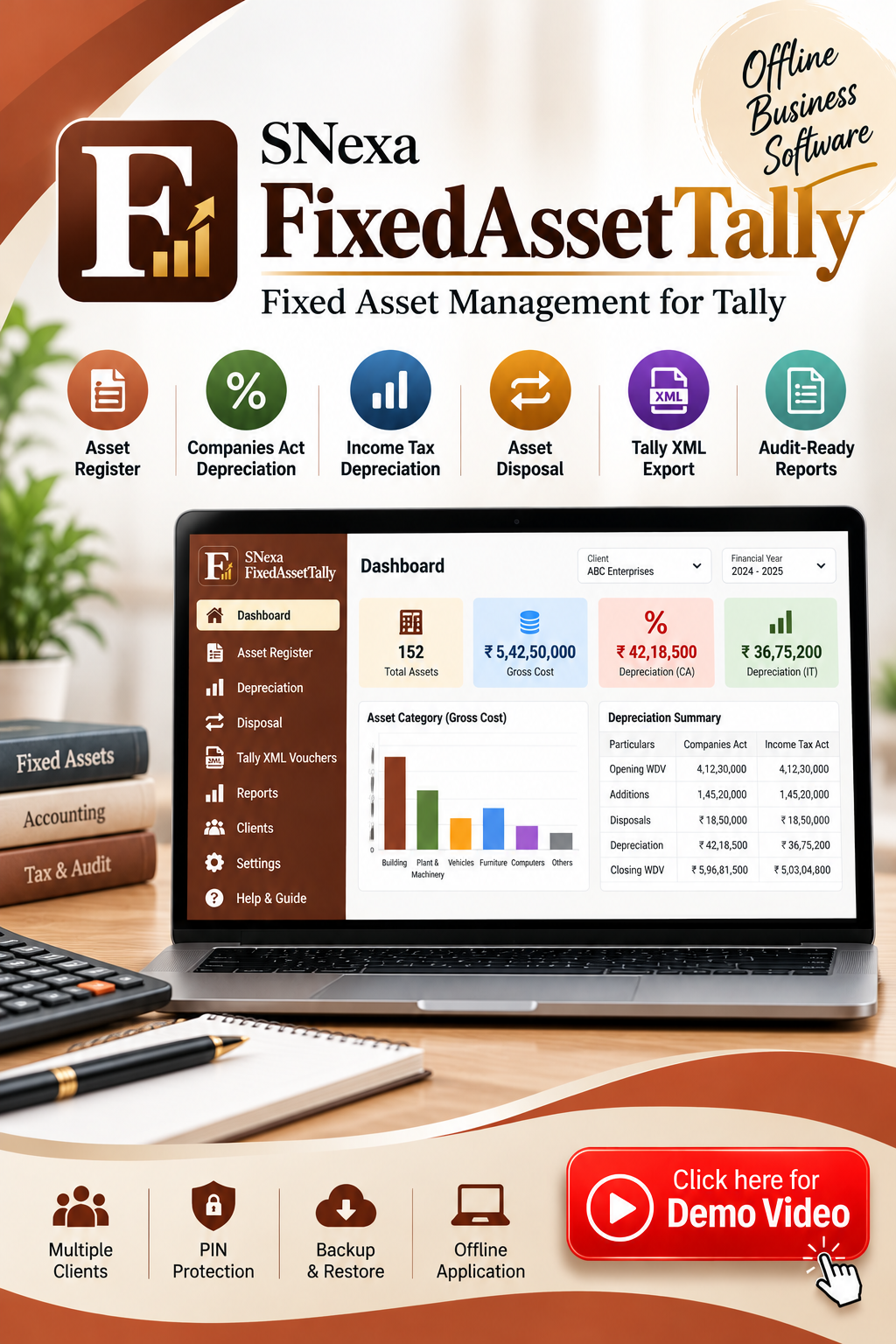
SNexa FixedAssetTally – Fixed Asset Register, Depreciation & Tally XML Software


- Rs. 899
Rs. 5,999- Rs. 899
- Unit price
- per
🎓 Subscribe for Free Classes & Book Reviews
Subscribe on YouTubeProduct Information
xPackage Details |
Software Access Link |
Sold & Dispatched By |
StudyNexa |
Validity |
Lifetime Access |
No. Of Views |
Unlimited |
System Requirements |
Windows,IOS & Andriod Any Device (No Internet Required) |
Delivery |
Within 48 Hours |
Brand |
StudyNexa |
Description
x
FIXED ASSET MANAGEMENT SOFTWARE
SNexa FixedAssetTally
Fixed Asset Register, Depreciation & Tally XML Software
Manage fixed assets, calculate depreciation under Companies Act and Income Tax Act, handle asset disposals, generate Tally-compatible Journal Voucher XML and export audit-ready depreciation schedules — all through one organised workflow.
Asset Register
Depreciation
Tally XML
Audit Reports
Simplify Your Fixed Asset & Depreciation Workflow
SNexa FixedAssetTally brings asset registration, depreciation calculation, disposal handling, Tally voucher preparation and reporting together in one dedicated fixed asset workflow.
Designed for CA firms, accountants and businesses that need a structured way to maintain fixed asset records and work with both Companies Act and Income Tax depreciation requirements.
KEY BENEFITS
Why Choose SNexa FixedAssetTally?
Reduce repetitive fixed asset work and bring your depreciation workflow into one organised system.
01
Centralised Asset Register
Maintain fixed asset information for each client and financial year in one structured register.
02
Two Depreciation Views
Work with Companies Act and Income Tax depreciation from the same asset information.
03
Reduce Manual Work
Reduce repetitive spreadsheet calculations and manual depreciation working.
04
180-Day Rule Handling
Income Tax depreciation separates additions used for 180 days or more from qualifying additions used for less than 180 days.
05
Easier Asset Disposal
Record disposal information and calculate the resulting depreciation and disposal impact.
06
Tally XML Generation
Generate Journal Voucher XML after mapping the required Tally ledger names.
07
Audit-Ready Schedules
Export Companies Act and Income Tax depreciation schedules as CSV files for audit documentation.
08
Multiple Client Management
Keep separate registers, financial years and histories for different clients.
09
Roll Forward to Next FY
Carry closing WDV into the next financial year as opening WDV.
10
Offline + PIN Protection
Keep client data locally on the device with PIN protection and backup/restore support.
Powerful Features
Everything you need to manage fixed assets, calculate depreciation and prepare accounting outputs.
Asset Register
Record asset name, asset class, IT block, put-to-use date, depreciation method, useful life, salvage percentage, gross cost, opening WDV and disposal details.
Excel Import
Download the blank template and paste asset rows directly from Excel. Column headers are matched automatically.
Companies Act Depreciation
Calculate asset-wise depreciation using useful life under the Companies Act 2013 / Schedule II workflow.
Income Tax Depreciation
Calculate depreciation using block-of-assets methodology and applicable treatment for additions used for less than 180 days.
SLM & WDV
Support for Straight Line Method and Written Down Value depreciation workflows under the Companies Act calculation.
Asset Disposal
Enter disposal date and value and calculate the applicable disposal impact for the selected depreciation basis.
Tally XML Vouchers
Map ledger names and generate Journal Voucher XML for import into Tally.
Audit-Ready Reports
Export Companies Act and Income Tax depreciation schedules as CSV files.
Multiple Clients
Switch between clients while keeping their registers, financial years and history separate.
Backup & Restore
Download client-data backups and restore them when required.
COMPARISON
Manual Process vs SNexa FixedAssetTally
See the difference between managing fixed asset work manually and using a dedicated fixed asset workflow.
| Work Area | Traditional / Manual | SNexa FixedAssetTally |
|---|---|---|
| Asset Register | Separate Excel files | ✓ Centralised register |
| Excel Import | Manual copy / setup | ✓ Paste directly from Excel |
| Companies Act Depreciation | Manual calculation | ✓ Automated calculation |
| Income Tax Depreciation | Separate working | ✓ Block calculation |
| 180-Day Rule | Manual checking | ✓ Automated treatment |
| Asset Disposal | Manual working | ✓ Built-in calculation |
| Tally Entries | Manual posting | ✓ Tally XML generation |
| Validation | Manual checking | ✓ Built-in validation |
| Audit Schedule | Prepare manually | ✓ CSV export |
| Multiple Clients | Multiple files | ✓ Client management |
| Next Financial Year | Manual carry-forward | ✓ Roll to next FY |
| Backup | Manual file management | ✓ Backup & Restore |
Companies Act vs Income Tax Act
Keep both depreciation views available from the same fixed asset workflow.
| Feature | Companies Act | Income Tax Act |
|---|---|---|
| Depreciation Basis | Individual assets | Block of assets |
| Useful Life / Rate | Useful-life based | Prescribed block rate |
| Depreciation Method | SLM / WDV | Block-based calculation |
| 180-Day Treatment | Asset-wise depreciation workflow | Half-rate treatment for qualifying additions |
| Disposal | Profit / Loss calculation | Block adjustment / STCG calculation |
| Output | Companies Act depreciation schedule | Income Tax block schedule |
From Asset Register to Tally in 5 Steps
A simple workflow from asset entry to depreciation, validation and Tally voucher preparation.
01
Add Assets
Enter assets manually or paste rows from Excel.
02
Calculate
Calculate Companies Act and Income Tax depreciation.
03
Validate
Review warnings and fix blocking errors.
04
Generate XML
Generate Journal Voucher XML for Tally.
05
Import to Tally
Import the downloaded XML through Tally.
Generate Tally-Compatible Journal Voucher XML
Map your ledger names once, generate the required XML and import the generated voucher file into Tally.
Depreciation Ledger
Map your depreciation expense ledger.
Accumulated Depreciation
Map the relevant accumulated depreciation / asset ledger.
Profit / Loss Ledgers
Map profit and loss on sale ledgers.
Import Workflow
- Open Tally → Gateway of Tally → Import Data → Vouchers.
- Select the generated XML file.
- Review the import result and exceptions reported by Tally.
Handle Asset Disposal Easily
Record disposal information directly against the asset and let the depreciation workflow account for the sale within the relevant financial year.
01
Disposal Date
Enter the actual disposal date.
02
Disposal Value
Record the value realised on disposal.
03
Depreciation
Calculate depreciation up to the sale date.
04
Disposal Impact
Calculate the applicable disposal result.
Built-In Validation Before Voucher Generation
Review important asset and depreciation issues before generating vouchers.
✓ Invalid Dates
✓ Missing Put-to-Use Date
✓ Missing Useful Life
✓ Negative WDV
✓ Invalid Disposal Details
✓ Depreciation Warnings
Red errors block voucher generation until corrected, while amber warnings highlight items that should be reviewed.
Audit-Ready Depreciation Reports
Prepare structured depreciation schedules that can be exported and attached to your audit working papers or supporting documentation.
CA
Companies Act Schedule
Export the Companies Act depreciation schedule in CSV format.
IT
Income Tax Block Schedule
Export the Income Tax block depreciation schedule in CSV format.
Built for Multiple Clients & Financial Years
Keep client records organised while continuing your asset and depreciation workflow from one financial year to the next.
Multiple Clients
Each client keeps its own register, financial years and history.
Roll to Next FY
Closing WDV is carried into the new year as opening WDV.
Closed Financial Year
Completed years become read-only and can be unlocked when corrections are required.
Offline, PIN Protected & Backup Ready
Designed for users who want their client fixed asset data maintained locally on their device.
Offline Application
Client data is stored locally on the device.
PIN Protection
Protect access using a 4–6 digit PIN with configurable auto-lock options.
Backup & Restore
Download a client-data backup and restore it when required.
Device-Based Licensing
The application uses a device ID and license key for activation.
Who Is SNexa FixedAssetTally For?
Built for professionals and businesses that regularly manage fixed assets, depreciation and accounting entries.
CA Firms
Manage fixed asset records across multiple clients.
Accountants
Simplify depreciation calculations and voucher preparation.
Businesses
Maintain organised fixed asset records and depreciation schedules.
Audit Work
Prepare structured depreciation schedules for documentation.
Everything in One Workflow
Asset Register
Excel Import
Companies Act
Income Tax
SLM / WDV
Asset Disposal
Tally XML
Audit Reports
Multiple Clients
Backup & Restore
Frequently Asked Questions
What is SNexa FixedAssetTally?
SNexa FixedAssetTally is fixed asset management and depreciation software designed to maintain asset registers, calculate depreciation under Companies Act and Income Tax workflows, handle disposals, generate Tally XML vouchers and export depreciation schedules.
Can I import my existing asset data from Excel?
Yes. You can download the blank template and paste rows directly from Excel. The application matches the column headers automatically.
Does the software calculate Companies Act depreciation?
Yes. Companies Act depreciation is calculated asset-wise using the applicable useful-life workflow, with SLM and WDV methods supported.
Does it calculate Income Tax depreciation?
Yes. Income Tax depreciation is handled using the block-of-assets workflow, including the treatment for additions used for less than 180 days.
Does it support the 180-day rule?
Yes. The Income Tax depreciation table separates additions used for 180 days or more from additions used for less than 180 days.
Can I record asset disposals?
Yes. Enter the disposal date and disposal value against the asset. The system calculates depreciation up to the disposal date and the applicable disposal result.
Does SNexa FixedAssetTally directly integrate with Tally?
The software generates Tally-compatible Journal Voucher XML files. These files are then imported into Tally through Tally's Gateway → Import Data → Vouchers workflow.
Can I manage multiple clients?
Yes. Each client has separate registers, financial years and history.
Can I roll my data into the next financial year?
Yes. The Roll to Next FY function carries closing WDV into the new financial year as opening WDV and handles the relevant year transition.
Is the application offline?
Yes. The application stores client data locally on the device.
Is there a backup and restore option?
Yes. You can download a full client-data backup in JSON format and restore it when required.
Why SNexa FixedAssetTally?
✓ One Fixed Asset Register
— Keep your asset information organised.
✓ Companies Act + Income Tax
— Work with both depreciation views.
✓ Tally XML
— Generate Journal Voucher XML for Tally import.
✓ Audit Reports
— Export depreciation schedules in CSV format.
✓ Multiple Clients
— Maintain separate client records and financial years.
✓ Offline & Protected
— Local data storage with PIN and backup options.
SNexa SOFTWARE
Simplify Your Fixed Asset & Depreciation Work
Maintain assets. Calculate depreciation. Handle disposals. Generate Tally XML. Prepare audit-ready schedules.
SNexa FixedAssetTally


