


SNexa eReader – Premium PDF Reading App with Smart Study Tools + 2 Free Bonus Products


- Rs. 899
Rs. 5,999- Rs. 899
- Unit price
- per
🎓 Subscribe for Free Classes & Book Reviews
Subscribe on YouTubeProduct Information
xPackage Details |
Software Access Link |
Sold & Dispatched By |
StudyNexa |
Validity |
Lifetime Access |
No. Of Views |
Unlimited |
System Requirements |
Windows,IOS & Andriod Any Device (No Internet Required) |
Delivery |
Within 48 Hours |
Brand |
StudyNexa |
Description
xINTRODUCING SNEXA eREADER
Your PDFs. Your Notes. Your Complete Reading Workspace.
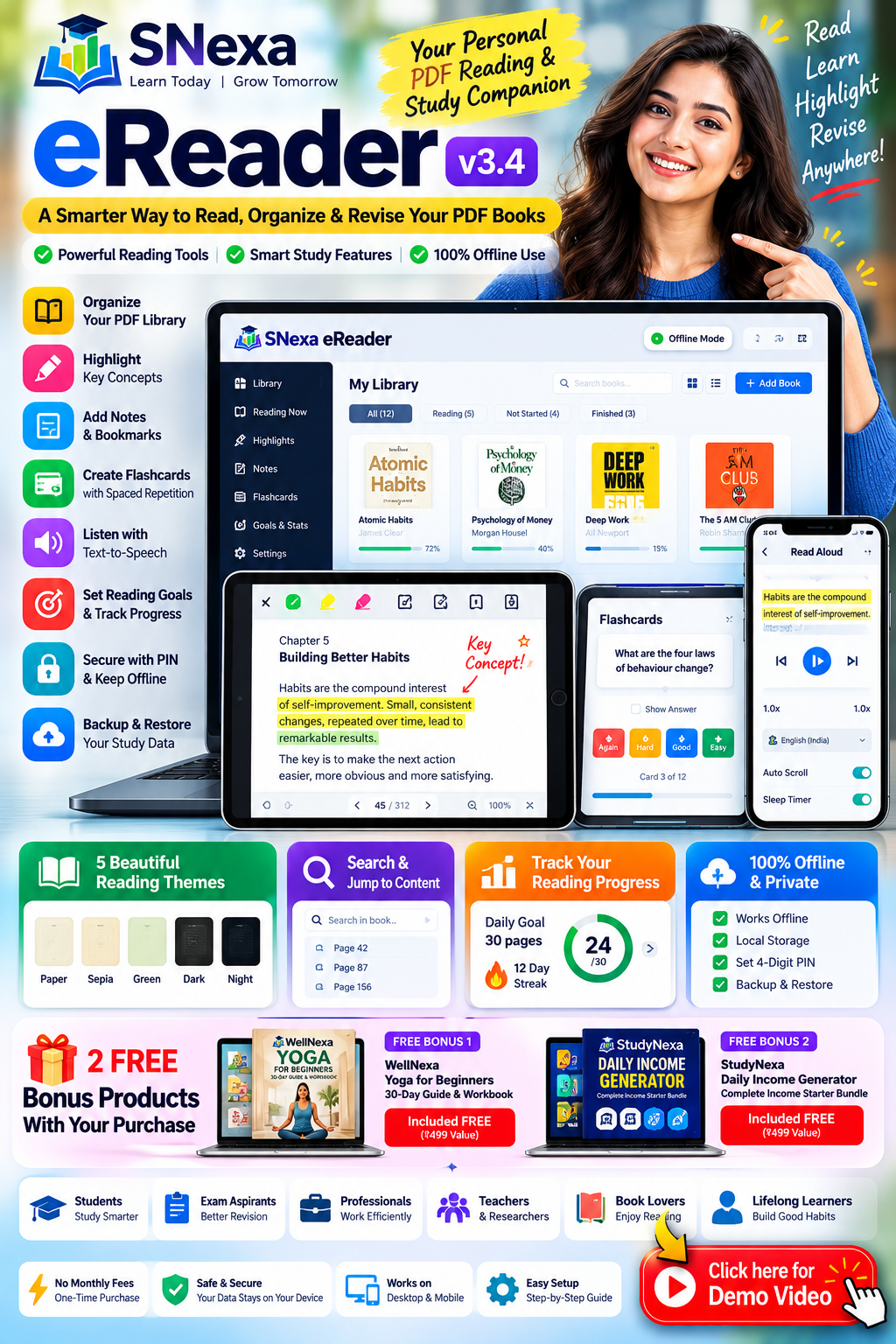
A smarter way to read, highlight, organise, revise and listen to your PDF books — with built-in study tools and offline-first convenience.
OFFLINE READING SMART FLASHCARDS NOTES & HIGHLIGHTS
Is Your PDF Reading Experience Holding You Back?
Reading digital books should be convenient. But when your PDFs, notes, highlights and revision materials are spread across different tools, staying organised can become difficult.
❌ Important concepts get lost among hundreds of pages.
❌ Finding previously marked information takes unnecessary time.
❌ Separate notes and flashcard apps interrupt your study flow.
❌ Revising formulas, definitions and difficult concepts can feel repetitive.
❌ Long reading sessions can be harder to manage without a consistent routine.
❌ Losing locally stored data can mean losing your reading progress and study notes.
SNexa eReader brings essential reading and revision tools together. Manage your PDF library, mark important passages, organise notes, practise recall with flashcards and track your reading routine in one workspace.
Everything You Need for a More Organised Reading Routine
📚 1. Personal PDF Library
- Import one or multiple PDF books.
- Automatically use the first PDF page as the cover where supported.
- Organise your books into shelves.
- Filter books by Reading, Not Started and Finished status.
- Store your imported PDF library in local browser storage on your device.
📖 2. Flexible PDF Reading and Navigation
- Navigate using screen edges, swipe gestures, a page slider or direct page jumps.
- Search for words throughout a book and highlight matching results.
- View the PDF's built-in contents when available.
- Choose fit-to-width or fit-to-page viewing.
- Zoom using pinch gestures or Ctrl + scroll on supported computers.
- Use keyboard shortcuts for faster reading and navigation.
🎨 3. Five Reading Themes
Customise the reading appearance to suit your preference and environment.
Paper Sepia Green Dark Night
- Dark and Night modes can invert PDF page colours.
- Extra dimming can lower the display brightness further where supported.
🖍️ 4. Four Colour-Coded Highlight Categories
Make important information easier to identify during revision.
- 🟡 Important: Mark key concepts and essential points.
- 🟢 Formula: Identify formulas and calculation-related content.
- 🔴 Revise: Flag material to revisit later.
- 🔵 Doubt: Mark topics that need further clarification.
Select text in a compatible PDF, adjust the selection and apply a colour. Tap an existing highlight to change its colour, add a note, create a flashcard or delete it.
📝 5. Notes, Notepad and Bookmarks
- Bookmark important pages for quick access.
- View your highlights and notes together in the Notes panel.
- Filter entries by highlight colour and jump to their locations.
- Maintain a separate free-form notepad for each book.
- Export notes as a text file for reference.
🧠 6. Flashcards with Spaced Repetition
Turn reading into active revision by creating flashcards from selected PDF text or by creating cards manually.
- Write a question and use selected text as the answer.
- Review cards from the library's flashcard section.
- Rate your recall using Again, Hard, Good and Easy.
- Use review intervals of approximately 1, 3, 7, 16 and 35 days as you progress.
- Cards you miss return the same day.
- See the number of flashcards due for review today.
Useful for revising definitions, formulas, technical terms, concepts and other material that benefits from repeated recall.
🔊 7. Read Aloud and Text-to-Speech
- Start listening from a selected line or sentence.
- Follow the highlighted sentence as the page scrolls.
- Play, pause, skip sentences and resume playback.
- Adjust playback speed from 0.5× to 2×.
- Choose device-installed voices, including Indian English or Hindi when available.
- Use a sleep timer and automatic page-to-page continuation.
- Listen offline when the required device voices are installed.
🎯 8. Daily Reading Goals and Insights
- Set a daily reading goal.
- Track reading streaks to support a consistent routine.
- Review reading insights and progress.
- Use book status to organise what to start, continue or finish.
🔒 9. Offline-First and Local Data Storage
- Read imported PDFs offline after setup and import.
- Keep PDFs in the browser's local IndexedDB storage.
- Store notes and progress locally.
- Set a four-digit PIN and recovery question to help restrict casual access.
- Activate the licence offline after receiving your device-specific activation key.
Privacy and security: Local storage is not the same as encrypted storage. The app PIN does not encrypt files or protect against someone with full access to the device's browser data.
💾 10. Backup and Restore
- Export highlights, notes, bookmarks, flashcards, progress and settings.
- Restore supported study data from a backup file.
- Keep a backup before clearing browser data or changing devices.
Important: PDF files are not included in the backup. After restoring, select the same PDF files again to reconnect them. Clearing browser or site data can delete the locally stored library.
The Benefits of Using SNexa eReader
✅ Keep reading organised: Arrange PDFs into shelves and track their status.
✅ Find key information faster: Use search, bookmarks and colour-coded highlights.
✅ Build revision material while reading: Turn selected text into flashcards and add personal notes.
✅ Practise active recall: Review flashcards using a spaced-repetition workflow.
✅ Choose how you read: Switch themes or use text-to-speech where supported.
✅ Build consistency: Set reading goals and track your streak.
✅ Keep control of your local library: Store reading materials and study data on your device.
SNexa eReader vs. a Basic PDF Reader
A basic PDF reader is useful for opening documents. SNexa eReader adds a broader set of reading, organisation and revision features to the workflow.
| Feature | Basic PDF Reader | SNexa eReader |
|---|---|---|
| PDF reading and navigation | Usually | ✓ |
| Multiple reading themes | Varies | ✓ 5 themes |
| Colour-coded highlights | Varies | ✓ 4 categories |
| Notes and bookmarks | Varies | ✓ |
| Flashcards with spaced repetition | Not always | ✓ |
| Read aloud and speed control | Varies | ✓ Device voices |
| Reading goals and streaks | Not always | ✓ |
| Study-data backup and restore | Varies | ✓ |
Comparison is general and feature-based. Other PDF readers may offer some or all of these capabilities depending on their version and platform.
Who Can Benefit from SNexa eReader?
- Students: Organise textbooks, class notes and revision materials.
- Competitive exam aspirants: Mark important topics, formulas and doubts for revision.
- Professional course learners: Work through large study PDFs in a structured way.
- Teachers and researchers: Keep document-specific notes and bookmarks.
- Digital readers: Build a personal PDF library and a consistent reading routine.
- Auditory learners: Listen to compatible text using supported device voices.
EXTRA VALUE WITH YOUR PURCHASE
🎁 Get 2 Bonus Digital Products
Enjoy two additional digital resources with your purchase, according to the terms of this product offer.
FREE BONUS 01
WellNexa Yoga for Beginners – 30-Day Guide & Workbook
A beginner-oriented yoga guide and workbook to help you explore a structured 30-day practice routine.
Explore Bonus 1 →FREE BONUS 02
StudyNexa Daily Income Generator – Complete Income Starter Bundle
A digital starter resource for exploring income-generating activities and organising your next steps.
Explore Bonus 2 →Bonus availability and access are subject to the offer terms and delivery instructions provided with your order.
How to Get Started
Step 1: Place your order
Purchase SNexa eReader through the product page.
Step 2: Follow the supplied access instructions
Open the application using the delivery instructions provided with your purchase.
Step 3: Activate your licence
Copy your Device ID and send it to the seller with your order number. Enter the activation key you receive.
Step 4: Import your PDF books
Add your own PDFs and organise them into shelves.
Step 5: Personalise your reading
Choose a theme, set a daily goal, add highlights and notes, and create flashcards.
Step 6: Back up your study data
Export backups regularly and keep them somewhere safe.
Frequently Asked Questions
1. Does SNexa eReader work offline?
The application is designed for offline reading after setup and PDF import. Read-aloud functionality works offline when the required text-to-speech voices are installed.
2. Are my PDFs uploaded to a cloud account?
The supplied application stores imported PDFs in local browser storage on your device. The described reading workflow does not upload your PDF library to a cloud account.
3. Can I highlight text in scanned PDFs?
Text highlighting requires a selectable text layer. Scanned image-only PDFs may not support text selection, but you can use page notes and bookmarks.
4. Are PDF books included?
SNexa eReader is a PDF reading and study application. Your own PDF files are used unless a separate book or PDF is explicitly included in your order.
5. Does the backup include the PDF files?
No. The backup contains supported study data such as highlights, notes, bookmarks, flashcards, progress and settings. You must keep the original PDFs separately.
6. Can I transfer my licence to another device?
The supplied licence instructions specify one key for one device. Contact the seller with your new Device ID and order number to request a new key when changing devices.
7. Does the PIN encrypt my files?
No. The four-digit PIN helps restrict casual access to the application but does not encrypt files stored in browser data.
8. Can I add the app to my home screen?
A Home Screen installation option is available on compatible devices and browsers. Exact availability depends on the platform.
Important Product Information
- This is a digital software product, not a physical book unless separately stated.
- Licence activation requires your Device ID and order number to obtain an activation key.
- PDF text selection depends on the structure of the original document.
- Study data is stored locally. Back up regularly before clearing browser data or changing devices.
- Text-to-speech voices and installation options depend on device and browser compatibility.
- Review the individual bonus product descriptions for their contents and access details.
Make Every Reading Session More Organised
Bring your PDF library, notes, highlights, bookmarks and revision flashcards together with SNexa eReader.
Read Better. Organise Smarter. Revise with Purpose.


