


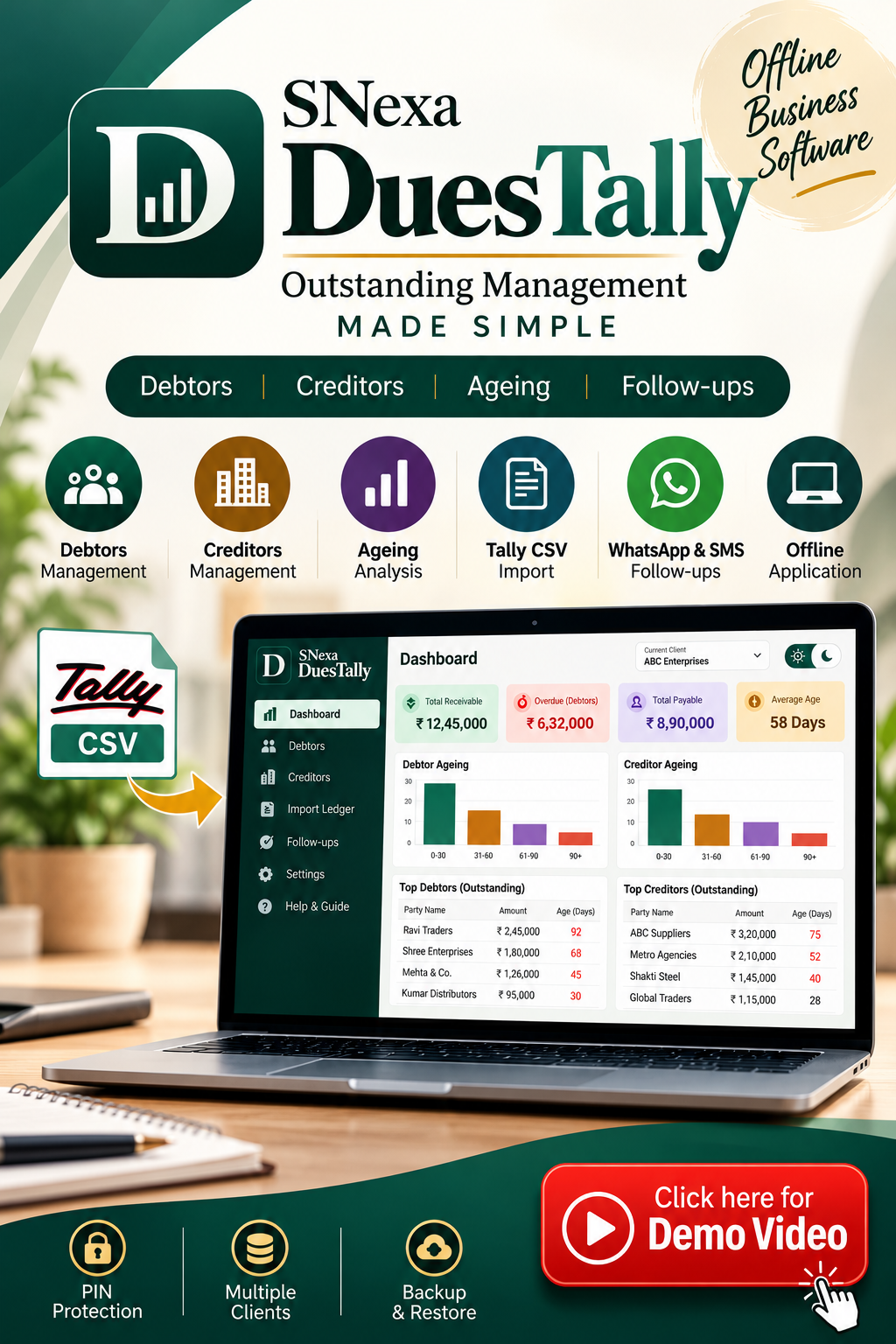
SNexa DuesTally – Offline Debtor, Creditor & Outstanding Management Software


- Rs. 899
Rs. 5,999- Rs. 899
- Unit price
- per
🎓 Subscribe for Free Classes & Book Reviews
Subscribe on YouTubeProduct Information
xPackage Details |
Software Access Link |
Sold & Dispatched By |
StudyNexa |
Validity |
Lifetime Access |
No. Of Views |
Unlimited |
System Requirements |
Windows,IOS & Andriod Any Device (No Internet Required) |
Delivery |
Within 48 Hours |
Brand |
StudyNexa |
Description
x
SNexa Business Software
SNexa DuesTally
Offline Debtor, Creditor & Outstanding Management Software
Import your outstanding data, analyse receivables and payables, understand ageing, identify overdue parties and prepare payment follow-ups — all from one simple offline business tool.
Debtors
Creditors
Ageing
Tally CSV
WhatsApp & SMS
Offline
Stop Managing Outstanding Payments Through Scattered Excel Sheets
Tracking customer outstanding amounts, supplier dues, ageing and payment follow-ups manually can become difficult when your business has multiple parties and multiple bills.
SNexa DuesTally brings your debtor and creditor outstanding information into one structured dashboard. You can work with exported Tally data, analyse ageing party-wise, identify overdue amounts and prepare reminders for follow-up.
It is designed as an offline-first outstanding management tool where your working ledger data remains on your device.
Everything You Need to Manage Outstanding Accounts
A focused tool for receivables, payables, ageing and payment follow-up.
📊
Outstanding Dashboard
See total receivables, overdue debtor amounts, total payables and average age of open bills at a glance.
👥
Debtor Management
Identify who owes you and analyse outstanding amounts party-wise.
🏢
Creditor Management
Track what your business owes to suppliers and other creditors.
⏱️
Ageing Analysis
Group outstanding bills into configurable ageing buckets and quickly identify older dues.
📥
Tally CSV Import
Export outstanding information from Tally and bring the relevant ledger data into DuesTally.
💬
WhatsApp & SMS Follow-ups
Prepare reminder messages for overdue debtors and open them for sending through WhatsApp or SMS.
🔐
PIN Protection
Protect access to the application with a 4-digit PIN.
💾
Backup & Restore
Export a backup and restore your working data when moving to another computer or recovering your setup.
Benefits of SNexa DuesTally
Built to make outstanding monitoring more organised, visible and easier to follow up.
01. Better Outstanding Visibility
Get a quick view of receivables, overdue amounts, payables and average bill age instead of manually checking multiple sheets.
02. Faster Tally-to-Tracking Workflow
Export your outstanding report from Tally and bring the relevant information into DuesTally for focused outstanding analysis.
03. Easier Ageing Analysis
Understand how old your open bills are through ageing buckets and identify parties requiring attention.
04. More Structured Follow-ups
See overdue parties, outstanding amount and days overdue in one place before contacting customers.
05. Multi-Client Organisation
Maintain separate client environments with separate ledgers, reminders, templates and ageing rules.
06. Offline Working
The core workflow does not require Tally to be running or an internet connection.
07. Local Data Storage
Your working ledger is stored locally in the browser on the device rather than being uploaded to a cloud server.
08. Proper Advance Handling
Advances and credits can be adjusted FIFO against older bills, while unused credit remains visible instead of being silently discarded.
One Dashboard for Your Outstanding Position
DuesTally gives you a central view of your receivables and payables, along with ageing information that helps you understand where outstanding amounts stand.
Total Receivable
Receivables
Overdue
Debtors
Total Payable
Creditors
Average Age
Open Bills
Simple Tally → DuesTally Workflow
Keep your existing accounting workflow and use DuesTally for focused outstanding management.
1️⃣
Export
Export your outstanding ledger report from Tally as CSV.
2️⃣
Import
Paste or import the relevant party, type, date, due date and amount information.
3️⃣
Analyse
Review dashboard totals, debtor ageing, creditor ageing and overdue parties.
4️⃣
Follow Up
Generate a reminder and open it in WhatsApp or SMS for sending.
Smart Outstanding Ageing
DuesTally calculates the age of an open bill using the Due Date when available. If a due date is not provided, the bill date is used.
Ageing buckets can be configured according to your workflow. The default structure uses:
0–30 Days
31–60 Days
61–90 Days
90+ Days
You can also customise the ageing thresholds from Settings to match your business requirements.
Intelligent Advance & Credit Adjustment
Customer advances and credit amounts do not simply disappear from your outstanding calculation.
Negative amounts, brackets or credit entries can be treated as advances and are adjusted using FIFO against the oldest positive bills first.
If credit remains after adjustment, the remaining credit is retained and displayed separately instead of being silently discarded.
Turn Overdue Lists Into Follow-up Actions
Knowing that a customer has an outstanding amount is only the first step. DuesTally helps you identify overdue debtor parties and prepare follow-up messages.
Overdue Party List
View overdue debtors together with outstanding amount and days overdue.
Reminder Templates
Use message templates with party, amount, date, days and firm placeholders.
Open the prepared reminder in WhatsApp and send it to the customer.
SMS
Use the SMS option for customers where a text-message follow-up is preferred.
Cleaner Data Import
DuesTally validates imported rows and can identify common data problems instead of silently accepting problematic entries.
Invalid Dates
Identifies unrecognised or impossible dates.
Invalid Due Dates
Flags a due date earlier than the bill date.
Unreadable Amounts
Identifies amounts that cannot be interpreted.
Duplicate Rows
Duplicate entries can be detected and skipped.
Manage Multiple Clients Separately
If you manage accounts for multiple businesses or clients, DuesTally provides a client switcher through Settings.
Each client can maintain separate ledgers, reminders, message templates and ageing buckets, helping keep different businesses organised.
Offline-First & Local Data
DuesTally works from a local browser-based environment. Your ledger data is stored on the device in the browser's local storage.
No Direct Tally Connection
DuesTally works with exported CSV or pasted data rather than requiring Tally to remain open.
Local Storage
Working ledger data stays on your device in browser storage.
Backup & Restore
Export a backup regularly and restore it when required.
Important: The application file itself does not carry
your ledger data to another computer. Use the built-in backup and
restore process when moving your data.
Security & License Controls
🔐 4-Digit PIN
Lock the application and require a PIN to access it.
🔑 License Key
License management is available through the Settings section.
💻 Device ID
The application provides a Device ID used for device-bound licensing and support.
🌗 Light & Dark Theme
Switch between light and dark interface modes.
Why Choose SNexa DuesTally?
DuesTally is not trying to replace your complete accounting system. It focuses specifically on the part that businesses often manage separately — outstanding, ageing and follow-up.
✓
Focused on Outstanding Management
Designed around debtors, creditors, ageing and overdue follow-up.
✓
Works Alongside Tally
Use exported Tally outstanding information without requiring a
direct Tally connection.
✓
Offline Workflow
Core outstanding management does not depend on a cloud dashboard.
✓
Practical Follow-up Tools
Move from identifying overdue parties to preparing WhatsApp or SMS
reminders.
✓
Suitable for Professional & Business Use
Useful for businesses, accountants, CA offices and professionals
handling multiple client ledgers.
SNexa DuesTally vs Manual Excel Outstanding Tracking
See how a focused outstanding-management workflow can simplify the process compared with maintaining everything manually.
| Feature | Manual Excel Tracking | SNexa DuesTally |
|---|---|---|
| Outstanding Dashboard | Manual setup | ✓ Built-in |
| Debtor Ageing | Manual formulas / sheets | ✓ Built-in |
| Creditor Tracking | Separate tracking often required | ✓ Dedicated section |
| Ageing Buckets | Manual configuration | ✓ Configurable |
| Tally CSV Workflow | Manual formatting | ✓ Import / Paste |
| Duplicate Detection | Manual checking | ✓ Supported |
| Advance / Credit Adjustment | Manual adjustment | ✓ FIFO handling |
| Overdue Follow-up List | Manual filtering | ✓ Built-in |
| WhatsApp / SMS Reminder Workflow | Separate process | ✓ Built-in workflow |
| Multiple Clients | Multiple files / sheets | ✓ Client switcher |
| PIN Protection | Depends on setup | ✓ Built-in PIN |
| Offline Workflow | ✓ | ✓ |
The DuesTally Advantage
Import Tally Outstanding Data → Analyse Ageing → Identify Overdue Parties → Follow Up
A focused workflow for businesses and professionals who want a cleaner way to manage receivables, payables and payment follow-ups.
Who Is SNexa DuesTally For?
🏪
Business Owners
Monitor customer and supplier outstanding positions.
📒
Accountants
Organise debtor and creditor ageing for business accounts.
⚖️
CA / Professional Offices
Maintain separate client environments and follow-up information.
🏢
SMEs & Trading Businesses
Track receivables and payables without building complex spreadsheets.
How to Get Started
Frequently Asked Questions
Does SNexa DuesTally connect directly to Tally?
No. DuesTally works with exported CSV or pasted data. Tally does not need to remain running for the DuesTally workflow.
Does DuesTally require an internet connection?
The core DuesTally workflow is designed to work offline.
Where is my ledger data stored?
Your working data is stored locally in the browser's storage on the device.
Can I manage multiple clients?
Yes. DuesTally provides a client switcher, with ledgers, reminders, templates and ageing buckets kept separately for each client.
What happens to customer advances?
Advances can be adjusted FIFO against older positive bills. Any remaining credit is retained and displayed rather than silently removed.
Can I customise ageing rules?
Yes. Ageing thresholds can be configured through Settings.
Can I send payment reminders through WhatsApp?
DuesTally prepares the reminder and provides a workflow to open it in WhatsApp or SMS. You then send the message.
Can I move my data to another computer?
Yes. Export a backup from Settings and restore that backup on the other computer. The application file itself does not carry your ledger data.
What date formats are supported?
DD-MM-YYYY, DD/MM/YYYY, YYYY-MM-DD and formats such as 05-Apr-2026 are supported.
Does DuesTally replace Tally or complete accounting software?
No. DuesTally is a focused outstanding, ageing and follow-up management tool designed to work with exported ledger information.
Take Control of Your Outstanding Accounts
Bring your outstanding data into one focused system, understand ageing, identify overdue parties and make your payment follow-up process more organised.
SNexa DuesTally
Debtors • Creditors • Ageing • Tally CSV • Follow-ups • Offline


