


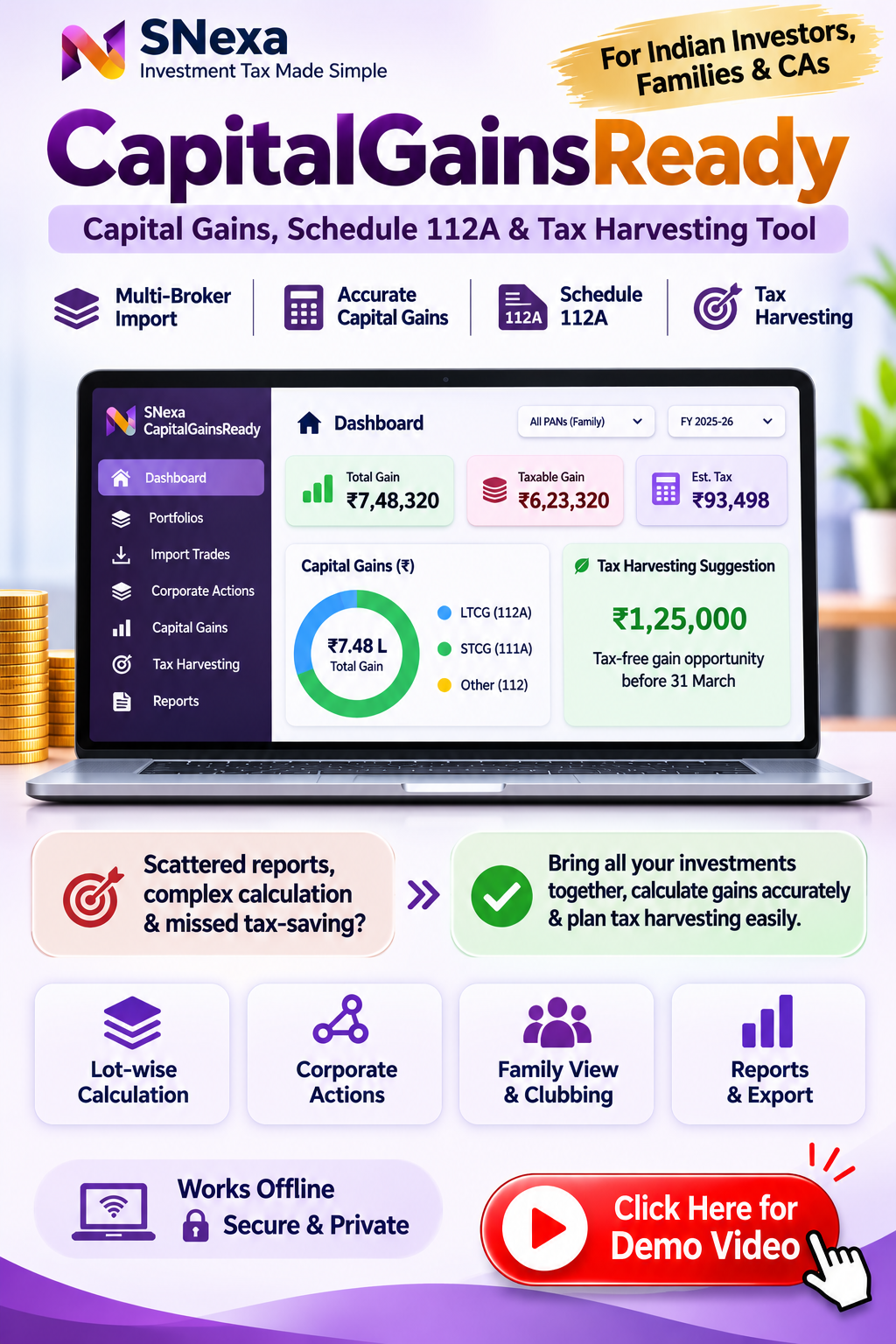
SNexa CapitalGainsReady – Capital Gains Calculator, Multi-Broker Portfolio Ledger, Schedule 112A & Tax Harvesting Tool


 Self Paced Learning

- Rs. 999
Rs. 5,999- Rs. 999
- Unit price
- per
🎓 Subscribe for Free Classes & Book Reviews
Subscribe on YouTubeProduct Information
xPackage Details |
Software Access Link |
Sold & Dispatched By |
StudyNexa |
Validity |
Lifetime Access |
No. Of Views |
Unlimited |
System Requirements |
Windows,IOS & Andriod Any Device (No Internet Required) |
Delivery |
Within 48 Hours |
Brand |
StudyNexa |
Description
xSNEXA • CAPITALGAINSREADY
Bring Your Capital Gains Records Together
A powerful offline capital gains calculation and tax-harvesting workspace for Indian investors, families and tax professionals.
Multi-broker ledger • Schedule 112A • Tax harvesting • Offline & encrypted
What is SNexa CapitalGainsReady?
SNexa CapitalGainsReady brings investment transactions from multiple brokers, demat accounts and mutual-fund sources into a consolidated, lot-by-lot ledger for each person in a household. It helps organise transactions, record corporate actions, calculate capital gains, review loss set-off, estimate tax on capital gains and prepare Schedule 112A working data.
Designed for Indian tax years, it includes year-specific rule settings, checks and a rule-base area that identifies items requiring verification. It is a calculation and working-paper aid—not a substitute for professional tax review or filing.
Key Benefits
Consolidate Multiple Accounts
Bring records from different brokers, demat accounts and mutual-fund folios into one organised workspace.
Understand Lot-Level Gains
Review acquisition lots, matched sales, holding periods, cost basis and gain classifications.
Explore Tax Harvesting
Model gain and loss harvesting scenarios, including relevant checks and estimated round-trip costs.
Keep Data Private
Work locally with a PIN-protected encrypted vault. Investment records are not uploaded to a product server.
Powerful Features
📥 Flexible Transaction Import
Import CSV, TSV, TXT and XLSX files, or paste rows from Excel. Bring in trade transactions, opening holdings and mutual-fund transactions with field mapping and review.
📚 Lot Ledger & FIFO
Build lot-level records and match disposals using FIFO. Review account-wise basis and the available aggregated basis setting.
🔁 Corporate Actions
Record splits, consolidations, bonus issues, mergers, demergers and buybacks so the ledger can reflect the actions entered.
📆 Grandfathering Records
Enter 31 January 2018 fair market values for applicable pre-February-2018 holdings and review their treatment.
🧮 Capital Gains Computation
Classify disposals under available gain heads, account for the 23 July 2024 rate-change period, review current-year and brought-forward loss set-off, and estimate tax on capital gains.
📄 Schedule 112A Preparation
Prepare scrip-wise Schedule 112A working data and export a CSV and Excel copy for review against the applicable portal utility.
👨👩👧 Family & Clubbing View
Maintain records for self, spouse, HUF and minors, group household members and review funding-source and Section 64 clubbing effects.
📊 Gain & Loss Harvest Planner
Explore potential gain and loss harvesting, record current prices and review Section 94(7)/94(8) checks and estimated round-trip costs.
✅ Pre-Filing Checks
Review warnings and fix-level items such as missing transaction history, missing grandfathering values and other disclosed assumptions.
📑 Reports & Working Papers
Generate a computation sheet, carry-forward certificate, working-paper workbook and signed data pack.
🔐 PIN-Protected Encrypted Vault
Local data protection uses AES-256-GCM encryption with a PIN-derived key. The PIN itself is not stored.
💾 Backup & Restore
Export an encrypted backup and restore it when moving to another computer or browser profile. Keep your PIN and backup files safe.
How the Workflow Works
1. Set Up — Add people, families, accounts and instruments.
2. Import — Bring in tradebooks, holdings and fund transactions.
3. Review Lots — Record corporate actions and grandfathering values.
4. Compute — Review gains, loss set-off and estimated tax.
5. Check & Export — Run checks and prepare schedules and working papers.
Who Can Use CapitalGainsReady?
- Individual investors with holdings across multiple brokers or demat accounts.
- Families tracking capital gains across self, spouse, HUF and minor-member records.
- Chartered accountants and tax professionals preparing capital-gains working papers.
- Investors and professionals who want an offline, locally stored calculation workspace.
Common Capital Gains Problems — and How CapitalGainsReady Helps
Capital gains preparation can become difficult when transactions are spread across accounts, older purchase records are missing, corporate actions are not reflected in tradebooks, or figures need to be reconciled before filing. CapitalGainsReady provides a structured workflow to help address these common challenges.
Problem: Records are scattered
How it helps: Create separate broker, demat and fund accounts, then consolidate imported transactions into a person-wise ledger.
Problem: Broker P&L shows only its own view
How it helps: Review acquisition lots and matched disposals across the accounts you have entered, and investigate differences against broker summaries.
Problem: Corporate actions change holdings
How it helps: Record splits, bonus issues, mergers, demergers and buybacks so the lot ledger can reflect the actions you record.
Problem: Older holdings need grandfathering data
How it helps: Enter applicable 31 January 2018 fair market values and review the resulting treatment in the lot records.
Problem: Gains and losses need to be brought together
How it helps: Review gain heads, current-year and brought-forward loss set-off, carry-forward figures and estimated tax on capital gains.
Problem: Family investments complicate the picture
How it helps: Group records for household members and review funding-source details and Section 64 clubbing effects.
Problem: Tax harvesting is difficult to evaluate
How it helps: Model hypothetical gain and loss harvesting scenarios, with relevant checks and estimated round-trip costs. The tool does not make investment decisions.
Problem: Filing working papers take time to organise
How it helps: Prepare Schedule 112A working data, a computation sheet, carry-forward certificate, working-paper workbook and signed data pack for review.
CapitalGainsReady vs Traditional Ways of Managing Capital Gains
The comparison below is with common manual workflows—not a claim that every broker, spreadsheet or tax product has the same features. Actual results depend on the records and inputs supplied.
| Work area | Manual spreadsheets / separate broker reports | SNexa CapitalGainsReady |
|---|---|---|
| Multiple accounts | Often requires separate files and manual consolidation. | Account-wise imports with person and household views. |
| Transaction-level records | Manual matching and formula maintenance may be needed. | Lot ledger with FIFO matching and disposal review. |
| Corporate actions | May need separate manual adjustments. | Dedicated register for recorded splits, bonuses, mergers, demergers and buybacks. |
| Grandfathering | Values and calculations may be tracked separately. | Dedicated 31 January 2018 FMV entry and review workflow. |
| Loss set-off & carry-forward | Often requires linked calculations and manual checking. | Dedicated computation, set-off and carry-forward views. |
| Family view | Separate person-wise files can be difficult to reconcile. | People and family grouping with clubbing review. |
| Harvest planning | Scenario calculations may need to be built manually. | Dedicated gain and loss harvest planning views. |
| Schedule 112A & reports | Scrip-wise working and supporting files may need separate preparation. | Schedule 112A CSV/Excel output and multiple working-paper reports. |
| Data privacy & access | Depends on where and how files are stored. | Offline local vault protected with PIN-derived encryption; user must maintain backups. |
Important: CapitalGainsReady does not remove the need to obtain complete source transactions, enter corporate actions and required values, verify tax rules, reconcile figures and review the applicable official return utility. It is a structured calculation aid, not automatic tax filing.
Why Choose SNexa CapitalGainsReady?
- One consolidated view: Bring supported investment records from multiple accounts into a person-wise or household ledger.
- Traceable calculations: Review lots, matched disposals, assumptions and checks instead of relying only on broker summary P&L.
- Purpose-built workflow: Move from imports and corporate actions to computation, Schedule 112A and working-paper exports.
- Privacy-focused operation: Works offline and keeps the encrypted vault on your device.
- Guided learning: Includes a detailed user manual covering setup, importing, calculations, harvesting, reports, backup and troubleshooting.
Important Compatibility & Scope Notes
- Designed for desktop use in current Google Chrome or Microsoft Edge on Windows, macOS or Linux. A phone browser can display figures, but importing and planning are easier on a larger screen.
- Works offline; no account, broker login, cloud upload or internet connection is required.
- Supports CSV, TSV, TXT and XLSX imports and rows pasted from Excel. PDF broker statements and contract notes are not read directly.
- Does not fetch live prices, broker transactions or 31 January 2018 fair market values. Users enter or import their own data and current prices.
- Does not file an income tax return automatically. Users review and transfer prepared figures to the applicable Income Tax portal workflow.
- Does not cover intraday or F&O business income, crypto taxation under Section 115BBH, or property capital gains. Foreign-share exchange-rate conversion and Schedule FA are not handled.
- Computes tax on capital gains only; it is not a complete computation of a person's total income tax liability.
- The rule base displays open verification points. Verify applicable law, rates, section references, portal formats, broker import headers, grandfathering data and post-1 April 2026 buyback treatment before relying on affected outputs.
Frequently Asked Questions
Does it need internet?
No. It is designed to run offline in a supported desktop browser.
Can I import transactions from multiple brokers?
Yes. Create an account for each broker, demat account or mutual-fund folio, then import the relevant records into the matching account.
Which import formats are supported?
CSV, TSV, TXT and XLSX files are supported, as are rows pasted from Excel. PDF statements are not read directly.
Does it calculate capital gains automatically?
It calculates from data you enter or import, subject to correct account setup, instrument classification, corporate actions, acquisition history and tax inputs. Review all checks and assumptions.
Does it support mutual funds?
Yes. Mutual-fund transactions can be imported. Select the correct instrument or fund class for the intended tax treatment.
Can it prepare Schedule 112A?
It prepares scrip-wise working data and provides CSV and Excel exports. Compare the export format with the current official portal utility before uploading or entering data.
Does it file my income tax return?
No. It prepares calculations and supporting working data. You or your tax professional must complete filing separately.
Is my financial data uploaded?
No. The vault is stored locally in the browser on your device and encrypted using a key derived from your PIN. The publisher cannot recover the vault if you lose the PIN.
Does the harvesting planner tell me what to sell?
No. It models the tax effect of hypothetical transactions. It does not provide investment advice or recommend buying or selling securities.
A More Organised Way to Prepare Capital Gains Working Papers
Bring supported broker and fund-house records together, review lot-level calculations, explore harvesting scenarios and prepare tax working papers with SNexa CapitalGainsReady.
Disclaimer: SNexa CapitalGainsReady is a calculation and record-keeping aid, not tax, legal, financial or investment advice. Outputs depend on the accuracy and completeness of user-entered and imported information and on assumptions and rule settings shown in the application. Tax laws, rates, forms and portal procedures may change. Some rule-base items are explicitly marked for verification. Review current official law and instructions and consult a qualified tax professional before filing or acting on any calculation. The application does not submit returns or recommend investment transactions.


