


SNexa BankBookMatch – Bank vs Tally Reconciliation Software | BRS & Tally XML


 Self Paced Learning

- Rs. 999
Rs. 7,999- Rs. 999
- Unit price
- per
🎓 Subscribe for Free Classes & Book Reviews
Subscribe on YouTubeProduct Information
xPackage Details |
Software Access Link |
Sold & Dispatched By |
StudyNexa |
Validity |
Lifetime Access |
No. Of Views |
Unlimited |
System Requirements |
Windows,IOS & Andriod Any Device (No Internet Required) |
Delivery |
Within 48 Hours |
Brand |
StudyNexa |
Description
xSNexa Professional Accounting Software
SNexa BankBookMatch
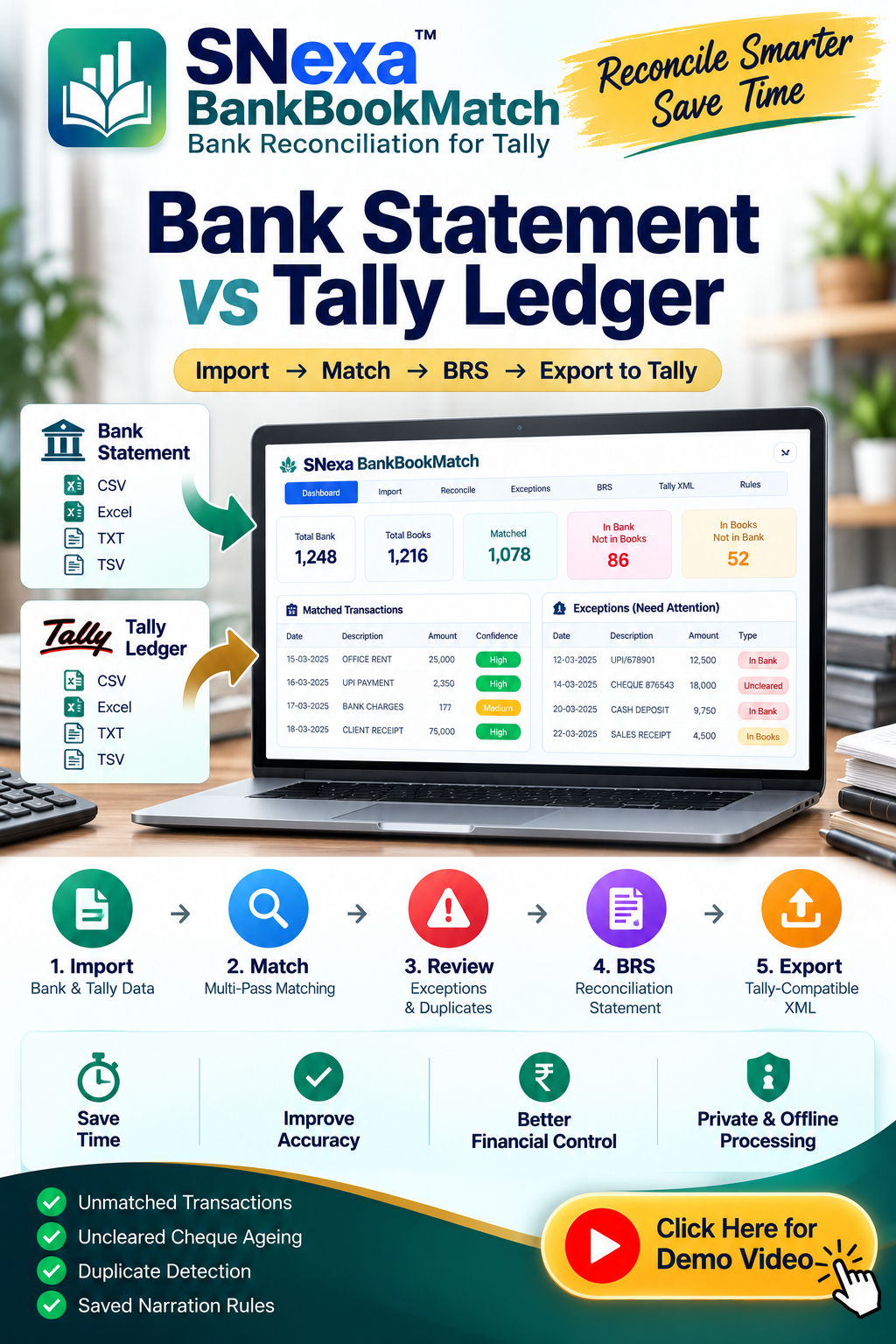
Bank Statement vs Tally Ledger — Reconcile Faster. Review Better. Work Smarter.
A structured bank reconciliation workflow for Chartered Accountants, accountants, bookkeepers and businesses. Import your bank statement and Tally bank ledger, match transactions, identify exceptions, prepare BRS and create Tally-compatible XML for selected missing entries.
✓ Bank Reconciliation ✓ BRS ✓ Exception Review ✓ Cheque Ageing ✓ Tally XML ✓ Offline
Why SNexa BankBookMatch?
Bank reconciliation becomes difficult when hundreds or thousands of transactions have to be compared between a bank statement and the corresponding Tally ledger. Different dates, narrations, references, bank charges, direct entries, uncleared cheques and duplicate-looking transactions can make manual reconciliation time-consuming.
SNexa BankBookMatch brings the entire reconciliation workflow into one structured process:
📥
Import
Load your bank statement and Tally bank ledger.
🔍
Match
Compare transactions using configurable matching passes.
⚠️
Investigate
Separate matched transactions from exceptions that need attention.
📄
Reconcile
Prepare the reconciliation statement and difference check.
📤
Export
Export reports, registers and selected Tally-compatible XML vouchers.
🚀 Key Benefits of SNexa BankBookMatch
The biggest advantage is not simply matching transactions — it is having a clear workflow for deciding what is already matched, what is missing, what needs review and what may need to be entered into Tally.
⏱ Reduce Manual Comparison
Instead of checking every bank and ledger line manually, use multi-pass matching to identify corresponding transactions and focus your attention on exceptions.
🔎 Find Missing Entries
Quickly identify transactions present in the bank statement but missing from the Tally books.
⚠️ See Exceptions Clearly
Separate unmatched bank entries, unmatched book entries, uncleared cheques and possible duplicates into dedicated review areas.
🧾 Track Uncleared Cheques
Use cheque ageing to identify book payments that have not yet been presented.
🔁 Identify Possible Duplicates
Flag transactions with identical amount, date and transaction side within a source for further review.
📄 Prepare BRS
Bring book balance, bank balance and reconciliation differences into a structured BRS workflow.
📤 Prepare Tally XML
Map relevant ledgers for selected missing entries and export a Tally-compatible XML file for import.
🧠 Reuse Rules
Save narration-to-ledger mappings and reuse them for recurring reconciliation work.
⚡ How SNexa BankBookMatch Works
📥
1. Import
Bank + Tally
→
🧠
2. Match
Multiple passes
→
⚠️
3. Review
Exceptions
→
📄
4. BRS
Reconcile
→
📤
5. Export
Reports / XML
📥 Import Your Bank & Tally Data
🏦 Bank Statement
Import your bank transaction data in supported spreadsheet or text formats.
- CSV
- Excel
- TXT
- TSV
- Paste rows directly
📚 Tally Bank Ledger
Import the bank ledger exported from Tally and compare it with the bank statement.
Tally → Display → Account Books → Ledger → Export
Note: Scanned or image-only statements are not directly supported. Export the transaction data from your bank portal into CSV or Excel first.
🧠 Intelligent Multi-Pass Matching
Configure how the reconciliation engine should compare transactions. The app provides multiple matching passes that can be enabled or disabled from Settings.
PASS 1
Exact Match
Same amount, same date and same transaction side.
PASS 2
Date Drift
Match the same amount where the date falls within the configured date window.
PASS 3
Reference & Narration
Use cheque numbers, UTR, RRN, party-name tokens and narration similarity.
PASS 4
Split & Consolidated
Match one transaction against a combined value of multiple entries on the other side.
Configurable Matching Controls
Date Drift Amount Tolerance Narration Similarity Split Match Limit Duplicate Flagging
✅ Review Matched Transactions
After reconciliation, matched transactions can be reviewed according to confidence level. This gives you a clearer view of which matches need additional attention.
HIGH CONFIDENCE
MEDIUM CONFIDENCE
NEEDS REVIEW
⚠️ Exception Management
The real value of reconciliation is knowing exactly what still needs attention. SNexa BankBookMatch provides dedicated exception views.
🏦
In Bank, Not in Books
Bank transactions that are not found in the Tally ledger.
📚
In Books, Not in Bank
Tally entries that have not appeared in the bank statement.
🧾
Uncleared Cheque Ageing
Review book payments that have not yet been presented.
🔁
Possible Duplicates
Flag transactions with identical amount, date and side within a source.
✋ You Stay in Control
Automatic matching cannot confidently resolve every real-world transaction. When you know that two entries belong together, you can manually select them and force a match.
Bank Row → Select → Book Row(s) → Match → Record Reason
Forced matches are recorded with a reason and carried into exports.
📄 BRS — Bank Reconciliation Statement
Once your transactions have been reconciled, use the BRS section to work with the closing balances and difference check.
Balance as per Books
Balance as per Bank
Difference Check
Print / Save as PDF
A BRS explains the differences between the book balance and bank statement balance; it does not itself replace the accounting entries required for book-side adjustments.
📤 From Bank Statement to Tally-Compatible XML
When a transaction exists in the bank statement but is missing from the books, you can review it, assign the appropriate ledger and prepare it for Tally XML export.
Bank Entry
→
Review
→
Ledger Mapping
→
Tally XML
→
Import in Tally
Important: The app does not directly connect to Tally. It creates a Tally-compatible XML file that you import using Tally's own import functionality. Referenced ledgers should exist in Tally before importing.
🧠 Save Your Narration-to-Ledger Rules
Recurring transactions often follow predictable narration patterns. SNexa BankBookMatch lets you maintain saved narration rules that can be reused during future reconciliation work.
Recurring Narration → Saved Rule → Ledger → Future Reconciliation
SNexa BankBookMatch vs Manual Bank Reconciliation
See how the workflow changes when reconciliation is organized into matching, exception review, BRS and export stages.
| Manual Reconciliation | SNexa BankBookMatch |
|---|---|
| Compare bank statement and Tally ledger line by line | Multi-pass transaction matching |
| Search manually for transactions missing from books | Dedicated “In Bank, Not in Books” exception list |
| Search for book entries not appearing in bank | Dedicated “In Books, Not in Bank” view |
| Manually identify outstanding cheques | Uncleared cheque ageing |
| Manually search for duplicate-looking entries | Possible duplicate detection |
| Keep separate lists of high/low-confidence matches | Confidence filters: High / Medium / Needs Review |
| Handle unusual matches manually without a structured record | Force match with recorded reason |
| Prepare BRS separately | Dedicated BRS workflow and difference check |
| Manually prepare missing bank entries for Tally | Ledger mapping + Tally-compatible XML export |
| Repeat the same narration mapping every month | Saved narration rules for reuse |
Complete Feature Comparison
👥 Who Should Use SNexa BankBookMatch?
👨💼 Chartered Accountants
Useful for recurring bank reconciliation and client accounting review.
📊 Accountants
Organize transaction matching, exception review and BRS preparation.
🧾 Bookkeepers
Handle bank-to-books comparison and prepare missing entries for review.
🏢 Businesses
Review bank transactions against internal accounting records.
💼 Practical Use Cases
Monthly Bank Reconciliation
Import the period's bank statement and compare it with the corresponding Tally ledger.
Year-End Cleanup
Identify old unmatched transactions, uncleared cheques and possible duplicates.
Bank Charges & Direct Entries
Find bank-side transactions that are not appearing in the books.
Client Review
Give your accounting team a structured exception list instead of a large raw statement.
Outstanding Cheques
Review book payments that remain uncleared.
Tally Entry Preparation
Map selected missing transactions to ledgers and prepare Tally-compatible XML.
🔒 Offline-First Workflow
The application is designed to process reconciliation data inside the browser. Its interface explicitly states that files are not uploaded and no server is contacted for the reconciliation workflow.
💻
Browser-Based
🔐
Local Processing
📦
Backup & Restore
🔑
PIN Protection
📤 Export & Reporting
CSV
Export matched entries and exception registers.
BRS
Print or save the reconciliation statement as PDF.
Tally XML
Export selected mapped bank entries as Tally-compatible XML.
Ledger List
Review the ledgers referenced by the XML export.
⭐ Complete Feature List
✓ Bank Statement Import
✓ Tally Ledger Import
✓ CSV Support
✓ Excel Support
✓ TXT / TSV Support
✓ Paste Rows
✓ Exact Matching
✓ Date Drift Matching
✓ Narration Matching
✓ Reference Matching
✓ Split Matching
✓ Confidence Filters
✓ Matched Entries
✓ Exception Management
✓ Bank-Only Entries
✓ Book-Only Entries
✓ Uncleared Cheque Ageing
✓ Duplicate Detection
✓ Force Match
✓ Recorded Match Reason
✓ BRS
✓ Difference Check
✓ CSV Export
✓ Tally XML Export
✓ Ledger Mapping
✓ Saved Narration Rules
✓ Configurable Tolerances
✓ Backup & Restore
✓ PIN Protection
✓ Offline Processing
❓ Frequently Asked Questions
What is SNexa BankBookMatch?
SNexa BankBookMatch is an offline-first bank reconciliation tool that compares a bank statement with a Tally bank ledger, identifies matches and exceptions, supports BRS preparation and can export selected entries as Tally-compatible XML.
Can I reconcile a bank statement with Tally?
Yes. Import the bank statement and the corresponding Tally bank ledger, then run the reconciliation workflow.
Can it find unmatched bank transactions?
Yes. The Exceptions section separates transactions found in the bank but not in books from transactions found in books but not in the bank.
Can it identify uncleared cheques?
Yes. It provides an uncleared cheque ageing view for book payments that have not yet been presented.
Can it detect duplicate transactions?
It can flag possible duplicates based on identical amount, date and transaction side within one source. These should be reviewed before taking action.
Can I manually match transactions?
Yes. You can select a bank row and one or more book rows and force a match, with a reason recorded for the forced match.
Can I prepare BRS?
Yes. The application includes a BRS section where book and bank closing balances can be entered and the reconciliation difference can be checked.
Can I export entries to Tally?
You can export selected mapped entries as a Tally-compatible XML file and then import that XML using Tally's own import functionality.
Does SNexa BankBookMatch directly connect to Tally?
No. The application works with exported data and creates a Tally-compatible XML file for import into Tally.
Does it process data online?
The application is designed to perform the reconciliation workflow locally inside the browser rather than uploading transaction files to a server.
⚠️ Important Before Using
- SNexa BankBookMatch is a reconciliation aid; it does not verify transactions against a bank or government system.
- Cheque, UTR and reference matching are pattern-level checks and should be reviewed.
- Review suggested matches before posting anything to the books.
- Scanned or image-only statements are not directly supported.
- The application does not directly connect to Tally; XML is exported and imported through Tally.
Stop Searching Through Bank Statements Manually.
Import your bank statement. Compare it with Tally. Find the exceptions. Prepare your BRS. Map missing entries. Export what needs to go into Tally.
START BANK RECONCILIATION →


